Password policy
Last updated: Nov 3, 2026
Objective
This document defines the measures and configurations that Fluid Attacks applies to its internal password management. These measures make sure that the passwords of the system are strong and protected, in accordance with recommended security best practices.
Description
Fluid Attacks has an internal password management policy to keep the data and systems of the organization secure and protected. These are the specifications and configurations of this policy.
Specifications
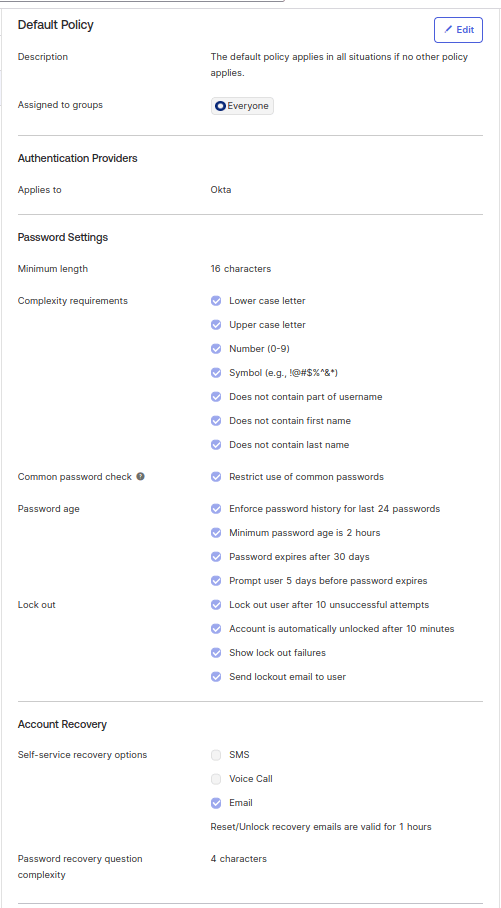
- Minimum password length: Passwords must have a minimum of 16 characters. This makes them more complex and more resistant to brute force attacks.
- Character requirements: Passwords must contain a minimum of 1 lowercase character, 1 uppercase character, 1 numeric character, and 1 special character. This gives more variety to the characters of a password.
- Password lifespan: The password lifespan is 6 months. If there is evidence that a password is compromised, Fluid Attacks makes the user change it immediately. This agrees with the latest updates to the NIST SP 800-63B guidelines.
- Password expiration notification: Users receive a notification 5 days before their password expires. This notification tells them to change it.
- Password history count: The system records the previous 24 passwords to prevent the reuse of recent passwords.
- Account lock after failed attempts: After 10 failed attempts, the system locks the account of the user automatically to prevent brute force attacks.
- Automatic unlock time: A lock continues for 30 minutes. Then, the system unlocks the account automatically.
- Secure password verification: The system makes sure that passwords do not contain the username, the first and last name, or common words. This prevents predictable passwords.
- Password recovery: To recover a password, users must send a ticket through the help channel. Then, the IT team processes it.
- Account lockout notification: If the system locks an account because of failed attempts, it sends an email notification to the user.
Configuration
Randomly generated passwords
Generated passwords must agree with the secure password policy of the organization. This requirement applies to all the systems and applications that Fluid Attacks uses and manages.
For new or reactivated accounts, Fluid Attacks uses randomly generated passwords. This also applies when the system has a "User must change password at next login" policy.
These passwords have this configuration:
- Maximum length of 64 characters. If a system does not support this length, Fluid Attacks sets the generated passwords to the maximum length that the system supports.
- Uppercase and lowercase letters
- Numbers and symbols. If the system does not support some symbols, select the supported symbols from the list in the password generator.
Requirements
These Fluid Attacks requirements apply to the controls on this page:
Other secure authentication measures
Authentication for clients
Clients authenticate on the Fluid Attacks platform using SSO with Bitbucket, Google, or Microsoft via OAuth 2.0 and JWT with no passwords stored.
Authentication for staff
Fluid Attacks staff authenticate using centralized IAM with passphrases, MFA, SAML, OAuth, biometrics, and other secure measures.