Skip to Content
logo

Docs

  • Home
  • Quick start
      • Glossary
      • CVSSF metric
      • Tutorial videos
      • Platform demo
      • Continuous Hacking methodology
      • Continuous Hacking PoV
      • Plans and free trial
      • What is SAST?
      • What is DAST?
      • Billing
      • Main website
      • What is SCA?
    • FAQ
      • Billing
      • Integrations
      • Platform
      • Scanner
      • Ask our pentesters to explain a vulnerability
      • Fix code with gen AI from the IDE
      • See safe dependency versions
      • Import repositories to test
      • Invite team members to sign up
      • Assign vulnerability remediation to a team member
      • See details of the reported security vulnerabilities
    • Sign up to Fluid Attacks
      • Break the build
      • Install CI Gate to break the build
      • Verify whether a fix was successful
  • Find and fix
    • Use the platform
        • Sign-up and login
        • Interface and sections
        • Groups section
        • Group configuration
        • Create and delete groups
        • Create another organization
        • Portfolios
        • ToE and SBOM
        • Register payment method
        • Members
        • Understand roles
        • Group authors
        • Organization authors
        • Repositories
        • Import them with OAuth
        • Repositories out of scope
        • Credentials
        • Environments
        • Resolve events
        • Vulnerabilities section
        • Examine evidence
        • Supply chain analysis
        • Reachability analysis
        • Vulnerability signature
        • CVSS score adjustment
        • Correlate threat models
        • Assign treatments
        • Assigned to you
        • Verify with reattacks
        • False positive requests
      • Help options
        • AI Agent
        • Live chat
        • Email
        • Comments
        • Talk to a Pentester
        • Tutorial videos or demo
        • Vulnerability reporting
        • Standard compliance
        • ZTNA logs
        • Recent downloads
        • Common analytics
        • Organization analytics
        • Group analytics
        • Portfolio analytics
        • Chart options
        • CI Gate configuration
        • CI Gate executions
        • Security gates
        • Vulnerability acceptance
        • Prioritization attributes
        • Explore the user menu
        • Enable and disable notifications
        • Subscribe to News
        • Leave a group
        • Fluid Attacks' scanners
        • OWASP Benchmark results
        • Your feedback
      • Use the scanners
        • Local run
        • CI/CD integration
        • Understanding outputs
        • Findings exclusion
      • Use a configuration file
        • SAST scanner
        • SCA scanner
        • DAST scanner
        • APK scanner
      • Automatic remediation
      • Custom remediation guides
    • Fix SCA vulnerabilities
      • Javascript
      • Python
      • Kotlin
      • Introduction to Sorts
      • Sorts user guide
      • Connection mechanisms
      • Cloud connection
      • Egress connection
      • Connector connection
      • Types of authentication
      • AWS CodeCommit
    • Service-level agreement
      • Availability SLA
      • Response SLA
      • Accuracy SLA
      • False negatives
      • False positives
      • Scope
    • Support information
      • Changelog
        • 2023
        • 2024
        • 2025
        • 2026
      • Roadmap
      • AI functions
      • Attack surfaces
      • Binaries
      • Browsers
      • CI/CD
      • CVEs for reachability
      • Evidence formats
      • Frameworks
      • IDE functionalities
      • Languages
      • Languages for fixes
      • Package managers
      • Remediation
      • SCM systems
      • Secrets
      • Standards
      • Ticketing systems
      • Documentation sections
  • Integrations
      • Bug-tracking systems
      • Tools and integrations
      • Install
      • Setup
      • Issue creation
      • Automatic issue creation
      • Link vulnerabilities
      • Vulnerability details
      • Request reattacks
      • Help options
    • Azure DevOps
    • GitLab
    • VS Code
      • Functions
      • Troubleshooting
      • Install the IntelliJ IDEA plugin
      • Identify and fix vulnerabilities from IntelliJ
      • Install the Cursor extension
      • Identify and address vulnerabilities from Cursor
    • MCP server
      • Installation
      • Capabilities and use cases
      • Docker installation
    • Peer Reviewer Assistant
      • For GitLab
      • For Azure DevOps
      • Troubleshooting
      • File exclusion
    • API
      • Learn the basics
    • Webhooks
  • Stack
      • Bash
      • Python
      • Rust
      • Terraform
      • TypeScript
      • Ariadne
      • Commitlint
      • D3
      • Docker
      • ESLint
      • GraphQL
      • Hypercorn
      • Kubernetes
      • Labels
      • Mypy
      • Nix Flakes
      • Platform audit logs
      • Platform authentication
      • Platform authorization
      • Pydantic
      • Pydantic AI
      • React
      • Ruff
      • Sops
      • Starlette
      • Tree-sitter
      • Visual Studio Code
      • AWS
      • Batch
      • Bedrock
      • BigCodeBench
      • BugSnag
      • Checkly
      • Claude 3.5 Sonnet
      • Cloudflare
      • CloudWatch
      • Cost Management
      • Datadog
      • dbt
      • DynamoDB
      • EBS
      • EC2
      • EKS
      • ELB
      • Engineering metrics
      • ePayco
      • EventBridge
      • GitLab
      • GitLab CI
      • Google Workspace
      • IAM
      • Jamf
      • KMS
      • Lambda
      • LogRocket
      • Okta
      • OpenAI
      • OpenSearch
      • Organizations
      • QuickSight
      • S3
      • SageMaker
      • Snowflake
      • Statuspage
      • Step Functions
      • Stripe
      • Treli
      • Ubiquiti
      • Vanta
      • Voyage AI
      • VPC
      • VPN
      • Zoho One
      • Zoho Sign
    • Pentesting tools
  • Compliance
    • Authentication
      • Clients
      • Password policies
      • Staff
    • Authorization
      • Access revocation
      • Clients
      • Employee termination
      • Endpoints
      • Secret rotation
      • Sessions
      • Staff
    • Availability
      • Distributed apps
      • Distributed firewall
      • Everything backed up
      • Multiple zones
      • Recovery objective
    • Confidentiality
      • Device (re)enrolling
      • Direct hiring
      • Encryption at rest
      • Encryption in transit
      • No personal gain
      • Personnel NDA
      • Secure deletion
    • Integrity
      • Applicant evaluation
      • Awareness
      • Certification Hub
      • Certified cloud provider
      • Certified security analysts
      • Comprehensive reporting
      • Developing for integrity
      • Monitoring
      • Production data isolation
      • Secure emails
      • SLSA compliance
      • Standard timezone
      • Static website
      • Training plan
    • Non-repudiation
      • Everything as code
      • Extensive logs
    • Privacy
      • Data privacy policy
      • Data retention policy
      • Data use policy
      • Email obfuscation
      • Time tracking
      • Manual for the NDR
      • Subprocessor OpenAI
      • OTR messaging
      • Polygraph tests
      • Project pseudonymization
      • Data transmission
      • Unsubscribe email
      • Use of cookies
    • Resilience
      • Continuity and recovery
      • Equipment and telecommuting
      • Everything is decentralized
      • Redundant roles
    • Transparency
      • Complaint management
      • Data leakage policy
      • Ethics hotline
      • Help channel
      • Incident management
      • Information security responsibility
      • Open source
      • Quality policy
      • Status page
      • Testing our technology
      • Vulnerability releasing
  • Compare
    • 42Crunch
    • 7 Way Security
    • Aikido
    • Anvil Secure
    • Apiiro
    • AppCheck
    • Appdome
    • Appknox
    • Aqua Security
    • Armorcode
    • Armosec
    • Arnica
    • Astra
    • Backslash
    • Base4
    • Bishop Fox
    • Black Duck
    • Black Hills
    • Breachlock
    • Bright Security
    • Burp Suite
    • Checkmarx
    • CloudGuard
    • Cobalt
    • Codacy
    • Conviso
    • Cure53
    • Cycode
    • Cyscope
    • Cyver
    • Data Theorem
    • DataDog
    • DeepSource
    • DefectDojo
    • Detectify
    • Devel
    • Dynatrace
    • Edgescan
    • Endor Labs
    • Evolve Security
    • Faraday Security
    • FortiDevSec
    • Fortify
    • GitHub Advanced Security (GHAS)
    • Ghost Security
    • GitLab Ultimate
    • GuardRails
    • HackerOne
    • Hackmetrix
    • Hadrian
    • HCL AppScan
    • Heeler
    • Hopper Security
    • ImmuniWeb
    • Inspectiv
    • Intigriti
    • Intruder
    • Invicti
    • JFrog
    • Jit
    • Kiuwan
    • Legit Security
    • Mandiant
    • Mend
    • Mindgard
    • Mobb
    • Moderne
    • NetSPI
    • NowSecure
    • Nucleus Security
    • Oligo Security
    • Opengrep
    • Orca Security
    • Oversecured
    • OX Security
    • Phoenix Security
    • PlexTrac
    • Praetorian
    • Prancer
    • Prisma Cloud
    • Probely
    • Prowler
    • ReversingLabs
    • RunSybil
    • RunZero
    • Safety
    • Securitum
    • Seemplicity
    • Semgrep
    • Snyk
    • Socket
    • SonarQube
    • Sonatype Lifecycle
    • SOOS
    • StackHawk
    • Strike
    • Synacktiv
    • Tenable Nessus
    • Theori
    • ThreatModeler
    • Veracode
    • White Jaguars
    • Wiz
    • Xygeni
    • YesWeHack
    • ZAP
    • ZeroPath

  • Log in to the platform 
  • Home
  • Quick start
      • Glossary
      • CVSSF metric
      • Tutorial videos
      • Platform demo
      • Continuous Hacking methodology
      • Continuous Hacking PoV
      • Plans and free trial
      • What is SAST?
      • What is DAST?
      • Billing
      • Main website
      • What is SCA?
    • FAQ
      • Billing
      • Integrations
      • Platform
      • Scanner
      • Ask our pentesters to explain a vulnerability
      • Fix code with gen AI from the IDE
      • See safe dependency versions
      • Import repositories to test
      • Invite team members to sign up
      • Assign vulnerability remediation to a team member
      • See details of the reported security vulnerabilities
    • Sign up to Fluid Attacks
      • Break the build
      • Install CI Gate to break the build
      • Verify whether a fix was successful
  • Find and fix
    • Use the platform
        • Sign-up and login
        • Interface and sections
        • Groups section
        • Group configuration
        • Create and delete groups
        • Create another organization
        • Portfolios
        • ToE and SBOM
        • Register payment method
        • Members
        • Understand roles
        • Group authors
        • Organization authors
        • Repositories
        • Import them with OAuth
        • Repositories out of scope
        • Credentials
        • Environments
        • Resolve events
        • Vulnerabilities section
        • Examine evidence
        • Supply chain analysis
        • Reachability analysis
        • Vulnerability signature
        • CVSS score adjustment
        • Correlate threat models
        • Assign treatments
        • Assigned to you
        • Verify with reattacks
        • False positive requests
      • Help options
        • AI Agent
        • Live chat
        • Email
        • Comments
        • Talk to a Pentester
        • Tutorial videos or demo
        • Vulnerability reporting
        • Standard compliance
        • ZTNA logs
        • Recent downloads
        • Common analytics
        • Organization analytics
        • Group analytics
        • Portfolio analytics
        • Chart options
        • CI Gate configuration
        • CI Gate executions
        • Security gates
        • Vulnerability acceptance
        • Prioritization attributes
        • Explore the user menu
        • Enable and disable notifications
        • Subscribe to News
        • Leave a group
        • Fluid Attacks' scanners
        • OWASP Benchmark results
        • Your feedback
      • Use the scanners
        • Local run
        • CI/CD integration
        • Understanding outputs
        • Findings exclusion
      • Use a configuration file
        • SAST scanner
        • SCA scanner
        • DAST scanner
        • APK scanner
      • Automatic remediation
      • Custom remediation guides
    • Fix SCA vulnerabilities
      • Javascript
      • Python
      • Kotlin
      • Introduction to Sorts
      • Sorts user guide
      • Connection mechanisms
      • Cloud connection
      • Egress connection
      • Connector connection
      • Types of authentication
      • AWS CodeCommit
    • Service-level agreement
      • Availability SLA
      • Response SLA
      • Accuracy SLA
      • False negatives
      • False positives
      • Scope
    • Support information
      • Changelog
        • 2023
        • 2024
        • 2025
        • 2026
      • Roadmap
      • AI functions
      • Attack surfaces
      • Binaries
      • Browsers
      • CI/CD
      • CVEs for reachability
      • Evidence formats
      • Frameworks
      • IDE functionalities
      • Languages
      • Languages for fixes
      • Package managers
      • Remediation
      • SCM systems
      • Secrets
      • Standards
      • Ticketing systems
      • Documentation sections
  • Integrations
      • Bug-tracking systems
      • Tools and integrations
      • Install
      • Setup
      • Issue creation
      • Automatic issue creation
      • Link vulnerabilities
      • Vulnerability details
      • Request reattacks
      • Help options
    • Azure DevOps
    • GitLab
    • VS Code
      • Functions
      • Troubleshooting
      • Install the IntelliJ IDEA plugin
      • Identify and fix vulnerabilities from IntelliJ
      • Install the Cursor extension
      • Identify and address vulnerabilities from Cursor
    • MCP server
      • Installation
      • Capabilities and use cases
      • Docker installation
    • Peer Reviewer Assistant
      • For GitLab
      • For Azure DevOps
      • Troubleshooting
      • File exclusion
    • API
      • Learn the basics
    • Webhooks
  • Stack
      • Bash
      • Python
      • Rust
      • Terraform
      • TypeScript
      • Ariadne
      • Commitlint
      • D3
      • Docker
      • ESLint
      • GraphQL
      • Hypercorn
      • Kubernetes
      • Labels
      • Mypy
      • Nix Flakes
      • Platform audit logs
      • Platform authentication
      • Platform authorization
      • Pydantic
      • Pydantic AI
      • React
      • Ruff
      • Sops
      • Starlette
      • Tree-sitter
      • Visual Studio Code
      • AWS
      • Batch
      • Bedrock
      • BigCodeBench
      • BugSnag
      • Checkly
      • Claude 3.5 Sonnet
      • Cloudflare
      • CloudWatch
      • Cost Management
      • Datadog
      • dbt
      • DynamoDB
      • EBS
      • EC2
      • EKS
      • ELB
      • Engineering metrics
      • ePayco
      • EventBridge
      • GitLab
      • GitLab CI
      • Google Workspace
      • IAM
      • Jamf
      • KMS
      • Lambda
      • LogRocket
      • Okta
      • OpenAI
      • OpenSearch
      • Organizations
      • QuickSight
      • S3
      • SageMaker
      • Snowflake
      • Statuspage
      • Step Functions
      • Stripe
      • Treli
      • Ubiquiti
      • Vanta
      • Voyage AI
      • VPC
      • VPN
      • Zoho One
      • Zoho Sign
    • Pentesting tools
  • Compliance
    • Authentication
      • Clients
      • Password policies
      • Staff
    • Authorization
      • Access revocation
      • Clients
      • Employee termination
      • Endpoints
      • Secret rotation
      • Sessions
      • Staff
    • Availability
      • Distributed apps
      • Distributed firewall
      • Everything backed up
      • Multiple zones
      • Recovery objective
    • Confidentiality
      • Device (re)enrolling
      • Direct hiring
      • Encryption at rest
      • Encryption in transit
      • No personal gain
      • Personnel NDA
      • Secure deletion
    • Integrity
      • Applicant evaluation
      • Awareness
      • Certification Hub
      • Certified cloud provider
      • Certified security analysts
      • Comprehensive reporting
      • Developing for integrity
      • Monitoring
      • Production data isolation
      • Secure emails
      • SLSA compliance
      • Standard timezone
      • Static website
      • Training plan
    • Non-repudiation
      • Everything as code
      • Extensive logs
    • Privacy
      • Data privacy policy
      • Data retention policy
      • Data use policy
      • Email obfuscation
      • Time tracking
      • Manual for the NDR
      • Subprocessor OpenAI
      • OTR messaging
      • Polygraph tests
      • Project pseudonymization
      • Data transmission
      • Unsubscribe email
      • Use of cookies
    • Resilience
      • Continuity and recovery
      • Equipment and telecommuting
      • Everything is decentralized
      • Redundant roles
    • Transparency
      • Complaint management
      • Data leakage policy
      • Ethics hotline
      • Help channel
      • Incident management
      • Information security responsibility
      • Open source
      • Quality policy
      • Status page
      • Testing our technology
      • Vulnerability releasing
  • Compare
    • 42Crunch
    • 7 Way Security
    • Aikido
    • Anvil Secure
    • Apiiro
    • AppCheck
    • Appdome
    • Appknox
    • Aqua Security
    • Armorcode
    • Armosec
    • Arnica
    • Astra
    • Backslash
    • Base4
    • Bishop Fox
    • Black Duck
    • Black Hills
    • Breachlock
    • Bright Security
    • Burp Suite
    • Checkmarx
    • CloudGuard
    • Cobalt
    • Codacy
    • Conviso
    • Cure53
    • Cycode
    • Cyscope
    • Cyver
    • Data Theorem
    • DataDog
    • DeepSource
    • DefectDojo
    • Detectify
    • Devel
    • Dynatrace
    • Edgescan
    • Endor Labs
    • Evolve Security
    • Faraday Security
    • FortiDevSec
    • Fortify
    • GitHub Advanced Security (GHAS)
    • Ghost Security
    • GitLab Ultimate
    • GuardRails
    • HackerOne
    • Hackmetrix
    • Hadrian
    • HCL AppScan
    • Heeler
    • Hopper Security
    • ImmuniWeb
    • Inspectiv
    • Intigriti
    • Intruder
    • Invicti
    • JFrog
    • Jit
    • Kiuwan
    • Legit Security
    • Mandiant
    • Mend
    • Mindgard
    • Mobb
    • Moderne
    • NetSPI
    • NowSecure
    • Nucleus Security
    • Oligo Security
    • Opengrep
    • Orca Security
    • Oversecured
    • OX Security
    • Phoenix Security
    • PlexTrac
    • Praetorian
    • Prancer
    • Prisma Cloud
    • Probely
    • Prowler
    • ReversingLabs
    • RunSybil
    • RunZero
    • Safety
    • Securitum
    • Seemplicity
    • Semgrep
    • Snyk
    • Socket
    • SonarQube
    • Sonatype Lifecycle
    • SOOS
    • StackHawk
    • Strike
    • Synacktiv
    • Tenable Nessus
    • Theori
    • ThreatModeler
    • Veracode
    • White Jaguars
    • Wiz
    • Xygeni
    • YesWeHack
    • ZAP
    • ZeroPath

  • Log in to the platform 

On This Page

  • Fluid Attacks uses the OWASP Benchmark
  • OWASP Benchmark measuring system
  • Fluid Attacks’ results
  • Reproduce Fluid Attacks’ OWASP Benchmark results
Find and fixUse the CLIOverviewOWASP Benchmark results

Scanner results regarding the OWASP Benchmark

Last updated: Mar 16, 2026

Fluid Attacks uses the OWASP Benchmark

Fluid Attacks  is committed to delivering highly accurate security testing results. This means minimizing errors from the automated tools and security analysts involved in the Continuous Hacking  solution. To measure accuracy, Fluid Attacks utilizes several benchmarks, including the OWASP Benchmark Project .

The Open Worldwide Application Security Project  (OWASP) is a non-profit foundation dedicated to helping improve software security. It operates as an open, online community where anyone can contribute resources and expertise related to application security (AppSec). This collaborative environment allows developers and security professionals to learn from each other and stay up-to-date on the latest threats and best practices.

The OWASP Benchmark Project  is a free Java test suite created in 2015 to assess the accuracy, speed and coverage of automated software vulnerability detection tools. It helps developers and security professionals identify the strengths and weaknesses of various AppSec testing solutions, allowing for objective comparisons between them.

The OWASP Benchmark allows for the evaluation of different types of security testing tools that apply any of these techniques:

  • Static application security testing (SAST )
  • Dynamic application security testing (DAST )
  • Interactive application security testing (IAST)

A tool’s performance is measured by its ability to correctly identify vulnerabilities (true positives) and secure code (true negatives) while minimizing incorrect assessments (false positives and false negatives). This evaluation provides a benchmark for choosing the right security testing tool for your software development lifecycle (SDLC).

OWASP Benchmark measuring system

The OWASP Benchmark utilizes two primary metrics to evaluate tool performance:

  • True positive rate (TPR) or Sensitivity: This indicates the percentage of actual vulnerabilities correctly identified by the tool. A higher TPR means the tool is more effective at finding real security risks.
  • True negative rate (TNR) or Specificity: This indicates the percentage of safe code correctly identified as non-vulnerable. A higher TNR means the tool is less likely to generate false alarms.

As mentioned earlier, two other classifications of assessments are possible; however, they are not treated further in this page:

  • True negatives: Correct reports of code, inputs or ports as being secure (these are desirable, as they allow you to address real security risks)
  • False negatives: Incorrect reports of code, inputs or ports as being secure (these are highly undesirable, as they can lead to a false sense of security and the potential deployment of vulnerable versions of your system into production)

The following illustration may help you better grasp the result categories, where the bigger circle encloses what the tool reports as vulnerable:
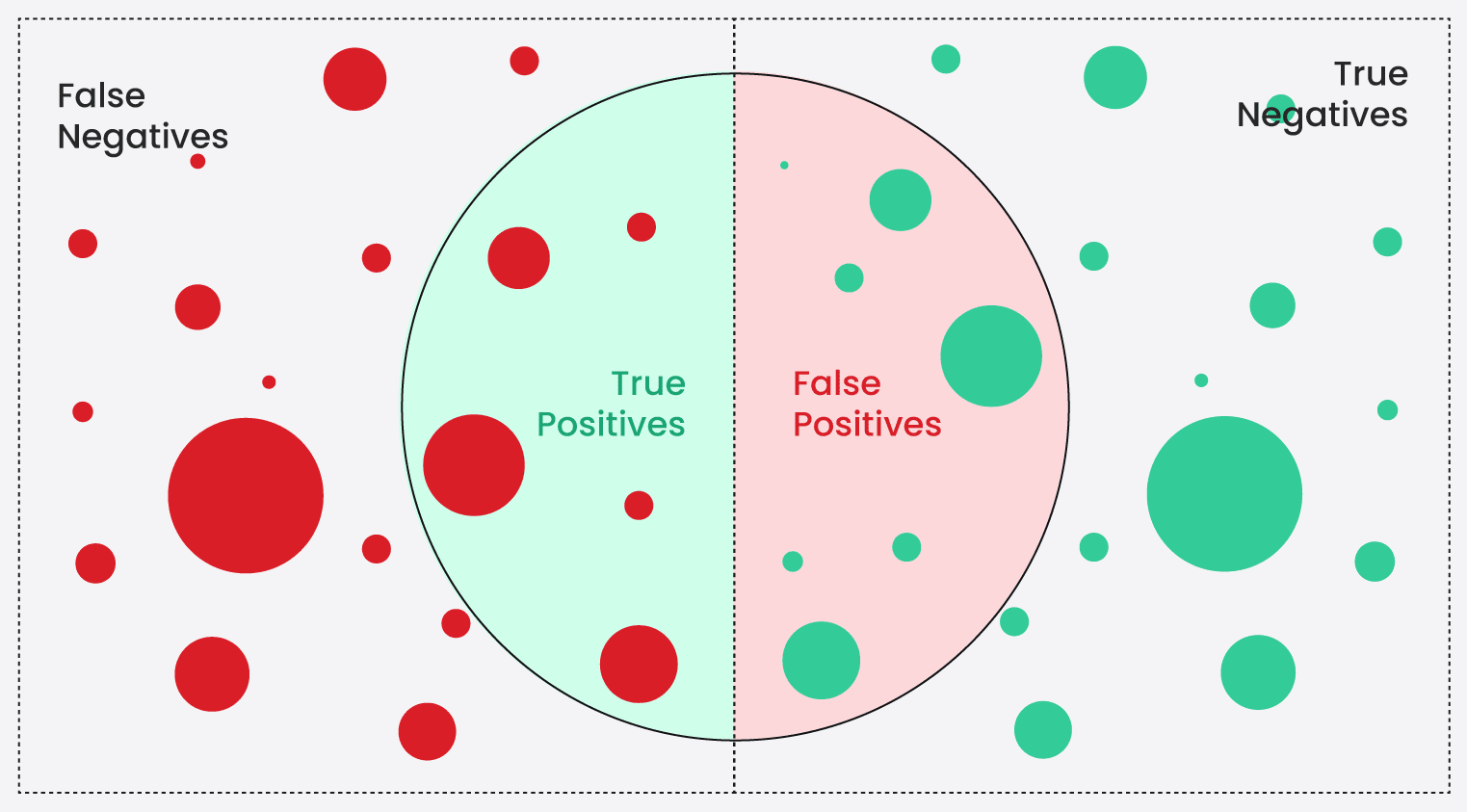
Understand true positives, false positives, true negatives, false negatives

Fluid Attacks’ results

To ensure high levels of accuracy, Fluid Attacks tested its SAST automated vulnerability detection tool —a core component of the Continuous Hacking plans — against the OWASP Benchmark test suite .

The following scorecard shows how Fluid Attacks’ scanner compares to other vulnerability detection tools measured against the OWASP Benchmark test suite:
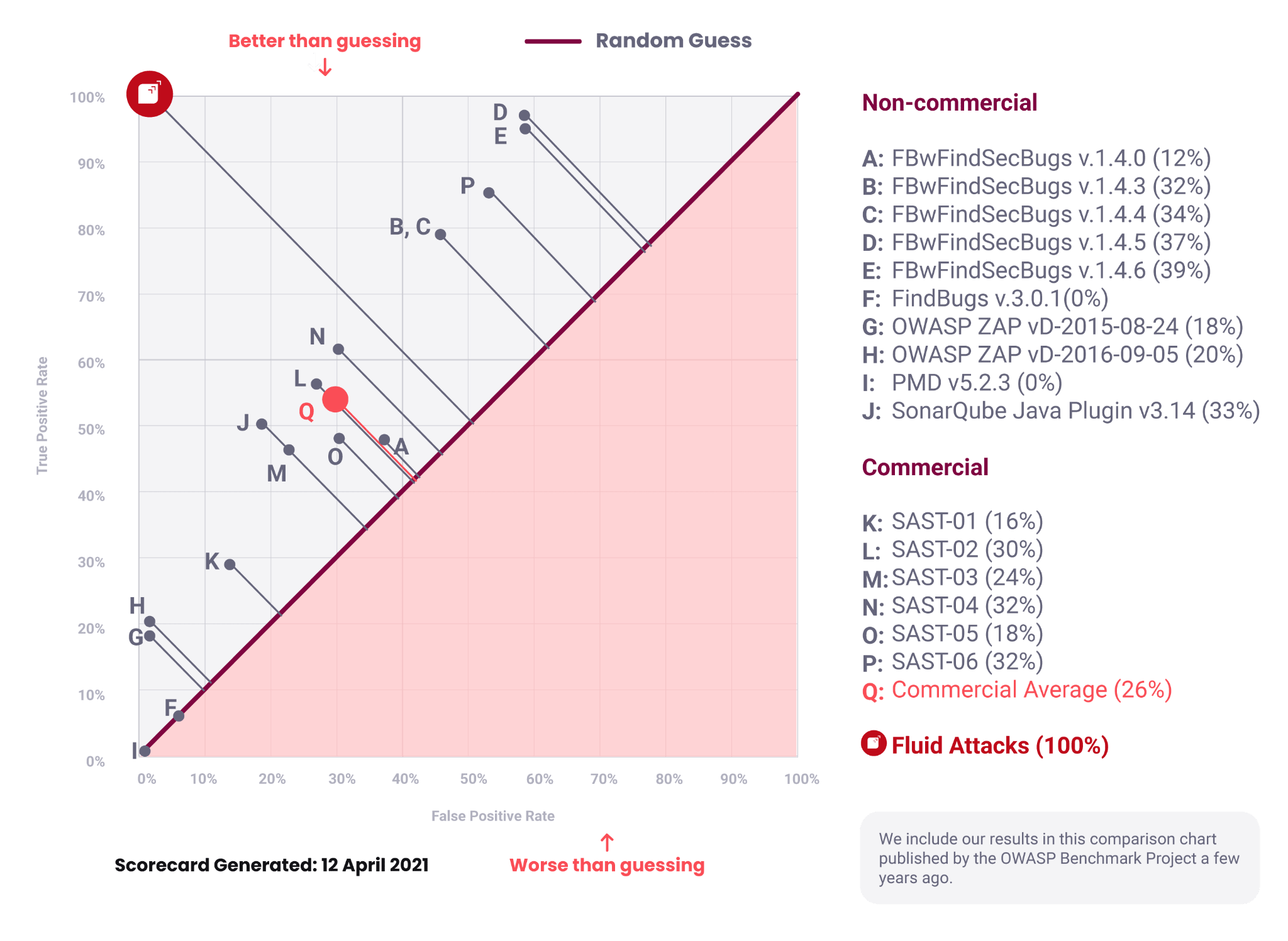
OWASP Benchmark results for the Fluid Attacks scanner

You can compare different tools by using the Youden’s J statistic : J = Sensitivity + Specificity - 1

As demonstrated in the image above, Fluid Attacks’ scanner consistently outperforms other vulnerability detection tools:

  • 100% True positive rate: The scanner accurately identifies all actual vulnerabilities in the test suite.
  • 0% False positive rate: The scanner does not flag secure code as vulnerable.

This exceptional performance translates to a perfect OWASP Benchmark Score of 100%, significantly exceeding industry averages:

  • Almost 3x higher than the average score of commercial (paid) vulnerability detection tools
  • More than 1.5x higher than the highest-scoring non-commercial (free) tool

What is most important, Fluid Attacks  cares about what you care:

  • Finding all vulnerabilities before they impact your business
  • Maintaining your team’s efficiency with zero false positives

Reproduce Fluid Attacks’ OWASP Benchmark results

All Fluid Attacks products are open source . You can download, inspect, and suggest modifications to the source code  behind them. Being open source gives customers confidence in Fluid Attacks’ transparency and security .

To verify the OWASP Benchmark results, follow these steps (or skip ahead to the one-step alternative):

  1. Install Docker  to be able to run Fluid Attacks’ main CLI scanner.

  2. Download the Docker container  and pull the image.

  3. Clone the OWASP Benchmark v1.2 repository:

    git clone https://github.com/OWASP-Benchmark/BenchmarkJava.git benchmarkcd benchmark
  4. Create a configuration file using the following content:

    checks: - F004 - F008 - F021 - F034 - F042 - F052 - F063 - F089 - F107 - F112 - F130 namespace: OWASP multifile: true output: file_path: /working-dir/results/Benchmark_1.2-Fluid-Attacks-v2024.csv format: CSV sast: include: - src/main/java/org/owasp/benchmark/testcode/ - src/main/java/org/owasp/benchmark/helpers/DatabaseHelper.java - src/main/java/org/owasp/benchmark/helpers/SeparateClassRequest.java - src/main/java/org/owasp/benchmark/helpers/Thing1.java - src/main/java/org/owasp/benchmark/helpers/Thing2.java - src/main/java/org/owasp/benchmark/helpers/ThingFactory.java - src/main/resources/benchmark.properties
  5. Execute the scan:

    docker run --rm -v .:/working-dir fluidattacks/sast:latest sast scan /working-dir/config.yaml

    Once the scan completes, the results are saved in a CSV file named Benchmark_1.2-Fluid-Attacks-v2024 located in the results/ folder of the cloned repository.

  6. Install the OWASP plugin. You need it to create a scorecard from the results. Fluid Attacks currently uses a modified version of the plugin to ensure compatibility with the latest scanner version. (A pull request  to add native support is open in the official OWASP Benchmark repository.)

    To install the plugin locally (make sure you have Maven  installed):

    cd .. git clone https://github.com/alejolagosm/BenchmarkUtils.git benchmark_utils cd benchmark_utils mvn install cd ../benchmark
  7. Inside the benchmark repository, add a YAML file named benchmark_config.yaml with the following content to use the plugin:

    expectedresults: expectedresults-1.2.csv
  8. Run the plugin to generate the scorecards:

    mvn org.owasp:benchmarkutils-maven-plugin:create-scorecard -DconfigFile=benchmark_config.yaml
  9. Open the results in your browser. Examples:

    On Firefox:

    firefox scorecard/Scorecard_Home.html

    On Google Chrome:

    google-chrome-stable scorecard/Scorecard_Home.html

Search for vulnerabilities in your apps for free with Fluid Attacks’ automated security testing! Start your 21-day free trial  and discover the benefits of the Continuous Hacking  Essential plan . If you prefer the Advanced plan, which includes the expertise of Fluid Attacks’ hacking team, fill out this contact form .

Fluid Attacks' scannersYour feedback

Fluid Attacks 2026. All rights reserved.