Endpoints
Last updated: Oct 13, 2026
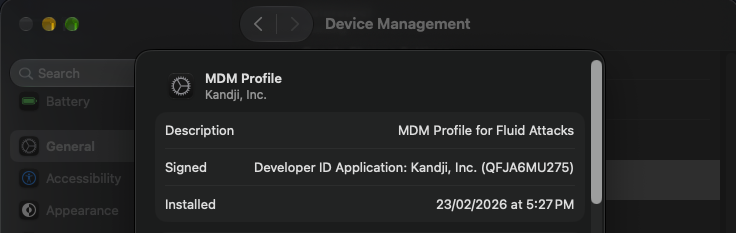
Device management
In order to protect our clients' data, we administer our devices with a Mobile Device Management (MDM) tool.
This tool enables the following:
- Comprehensive visibility into device compliance, security configuration, overall fleet risk, and device logs
- Enforcing full-disk encryption across endpoint devices to protect data at rest and manage security compliance
- Blocking unauthorized users or automated tools from restarting a device into its Recovery Operating System (Recovery Mode)
- Applying hardening configurations through Blueprints, which bundle pre-configured security settings and Library Items
- Restricting removable media and enforcing the security restrictions described on this page
- Detecting and blocking malware and malicious activity with endpoint detection and response (EDR)
- Identifying vulnerable software on our devices with vulnerability management
- Swift investigation of issues and automation of remediation workflows
- Disabling Bluetooth Sharing to prevent files from being shared through Bluetooth
- Disabling the Bonjour advertising service, which stops the device from advertising its services on the local network
- Enabling Secure Keyboard Entry, which prevents other applications from capturing what is typed in the terminal
- Enabling System Integrity Protection (SIP), which protects critical system files and processes from modification, even by administrators
- Enforcing a custom policy banner that displays the organization's access notification before login
- Ensuring that date and time are set automatically to keep the clock synchronized, which ensures accurate timestamps in logs
- Setting a retention period for
install.logto keep the software installation log for a defined period - Showing all filename extensions in Finder, which helps users identify file types and avoid disguised malicious files
- Showing the location icon in Control Center when system services request location
Additionally, the MDM automatically collects data from our IT assets, such as:
- Devices: General inventory of managed devices, including hardware details, OS version, and enrollment status
- Activation Lock: Whether Activation Lock is enabled on each device
- Application Firewall: Status and configuration of the built-in firewall
- Apps: Applications installed on each device and their versions
- Certificates: Certificates installed on each device
- Desktop & Screensaver: Screen lock and screensaver settings
- FileVault: Disk encryption status
- Gatekeeper & XProtect: Status of macOS built-in protections against untrusted software and malware
- Installed Profiles: Configuration profiles applied to each device
- Kernel Extensions: Kernel extensions loaded on each device
- Launch Agents & Daemons: Background items configured to start automatically
- Local Users: Local user accounts present on each device
- Startup Settings: Startup security configuration
- System Extensions: System extensions installed on each device
- Transparency Database: Permissions granted to apps to access protected resources, such as the camera, microphone, or files
Each user account is associated with a device, and access to these is also monitored and controlled (see the article about device enrollment).
The Blueprint is set up following our criteria.
Mobile devices assigned to users requiring a phone are managed via our MDM solution. Okta enforces an authentication policy granting access exclusively to MDM-managed devices. Additionally, mobile devices follow specific security configurations defined within the MDM Blueprint.
Endpoint detection and response (EDR)
Our managed devices run the EDR capabilities of our MDM tool. EDR monitors endpoint activity using behavioral detection, blocks malware and other malicious activity, and supports the investigation and remediation of detections. Detections are handled through our incident management process.
Malicious website and content filtering is handled separately through our web filtering controls.
Vulnerability management
The vulnerability management capability of our MDM tool identifies known vulnerabilities in the operating system and the applications installed on our managed devices. Findings are prioritized by severity, and remediation is carried out by updating or removing the affected software.
Self-Service
The Self-Service function allows users to access the enterprise app store, install apps, update software, and maintain their own device without a help desk ticket. All Self-Service-hosted applications are analyzed and approved/denied by our IT Manager and CTO. This applies to any additional application request employees send.
Device policy
We use a single MDM Blueprint for all Fluid Attacks devices, including laptops and iPhones, covering both administrators and regular users. This Blueprint includes the different policies required to manage and secure these devices.
Authorization
We control how devices can be accessed only by their intended users and how permissions over those devices are managed. We comply with the following criteria:
- Laptops' passwords and data are visible only to their users. The use of KeyChain is mandatory for all users for security purposes; to protect passwords saved in KeyChain, it automatically locks when the computer is locked or suspended.
- Automatic login is disabled to prevent data leaks; a password is required for system configuration and to access data.
- Access to the device is only possible through Okta Passport: users without an active account cannot log in. In addition, the local password is synchronized with the Okta password.
- Okta's password requirements are described in our password policy.
Requirements:
- 300. Mask sensitive data
- 185. Encrypt sensitive information
- 375. Remove sensitive data from client-side applications
- 096. Set user's required privileges
- 033. Restrict administrative access
- 341. Use the principle of deny by default
- 095. Define users with privilege
- 186. Use the principle of less privilege
- 229. Request access credentials
- 227. Display access notification
- 310. Request user consent
- 133. Password with at least 20 characters
- 130. Limit password lifespan
- 129. Validate previous passwords
- 141. Force re-authentication
- 369. Set a maximum lifetime in sessions
Updates
Apps from the App Store and Auto Apps are updated as soon as a new version is released, without IT having to run anything manually. Likewise, OS updates are managed automatically. Vulnerability management helps us identify outdated or vulnerable software on our devices so it can be updated or removed.
Users
We control how login is made on devices and create local accounts improving security:
- The guest account is disabled on all devices. Users without an active account cannot log in.
- The login window prompts a user for their credentials, verifies their authorization level, and then allows or denies the user access to the system.
- The presence of the Guest home folder can cause automated audits to fail when looking for compliant settings within all User folders as well. Rather than ignoring the folders' continued existence, it is best removed.
Requirements:
- 142. Change system default credentials
- 264. Request authentication
- 265. Restrict access to critical processes
- 266. Disable insecure functionalities
- 319. Make authentication options equally secure
Preferences
We control what the user can accomplish with manual configurations on the devices, restricting access to unnecessary system configurations to devices depending on their use for the different roles.
Requirements:
- 265. Restrict access to critical processes
- 261. Avoid exposing sensitive information
- 266. Disable insecure functionalities
- 177. Avoid caching and temporary files
- 045. Remove metadata when sharing files
- 046. Manage the integrity of critical files
- 185. Encrypt sensitive information
- 273. Define a fixed security suite
- 141. Force re-authentication
- 173. Discard unsafe inputs
Networking
We control how we handle insecure protocols and services, which can compromise the data stored on the devices:
HTTP Apache server and NFSD is part of the operating system and can be easily turned on to share files and provide remote connectivity to an end-user computer. Web sharing should only be done through hardened web servers and appropriate cloud services.
Requirements:
Auditing
We handle logs and monitor our devices for auditing purposes as follows:
- The audit system writes important operational and security information
that can be both useful for an attacker and a place for an attacker
to attempt to obfuscate unwanted changes that were recorded.
As part of defense-in-depth,
the
/etc/security/audit_controlconfiguration and the files in/var/auditshould be owned only by root with group wheel with read-only rights and no other access allowed. ACLs should not be used for these files. - The socketfilter firewall is what is used when the firewall is turned on in the Security PreferencePane. In order to appropriately monitor what access is allowed and denied logging must be enabled.
Requirements:
- 080. Prevent log modification
- 377. Store logs based on valid regulation
- 378. Use of log management system
- 079. Record exact occurrence time of events
- 075. Record exceptional events in logs
Removable devices
All removable devices are limited and controlled, including external disks, disk images, DVD-RAM, USB storage devices, and removable disc media, such as CDs, CD-ROMs, DVDs, and recordable discs.
The status of the control can be mountable and not mountable. Our current policy is completely restrictive, none of these devices can be mounted.
Requirements:
- 265. Restrict access to critical processes
- 266. Disable insecure functionalities
- 273. Define a fixed security suite
Fluid Attacks staff access and agree to the Endpoint Secure Management Policy through Vanta.
References
- SOC2®-CC6_2. Logical and physical access controls
- MITRE ATT&CK®-M1043. Credential access protection
- SANS 25-14. Improper Authentication
- POPIA-3A_23. Access to personal information
- PDPO-S1_4. Security of personal data
- CMMC-IA_L1-3_5_2. Authentication
- HITRUST CSF-10_c. Control of internal processing
- OWASP ASVS-4_3_1. Other access control considerations
Requirements
The following Fluid Attacks requirements apply to the controls described on this page:
- 033. Restrict administrative access
- 045. Remove metadata when sharing files
- 046. Manage the integrity of critical files
- 075. Record exceptional events in logs
- 079. Record exact occurrence time of events
- 080. Prevent log modification
- 095. Define users with privilege
- 096. Set user's required privileges
- 129. Validate previous passwords
- 130. Limit password lifespan
- 133. Password with at least 20 characters
- 141. Force re-authentication
- 142. Change system default credentials
- 173. Discard unsafe inputs
- 177. Avoid caching and temporary files
- 185. Encrypt sensitive information
- 186. Use the principle of less privilege
- 227. Display access notification
- 229. Request access credentials
- 261. Avoid exposing sensitive information
- 264. Request authentication
- 265. Restrict access to critical processes
- 266. Disable insecure functionalities
- 273. Define a fixed security suite
- 300. Mask sensitive data
- 310. Request user consent
- 319. Make authentication options equally secure
- 326. Detect rooted devices
- 329. Keep client-side storage without sensitive data
- 341. Use the principle of deny by default
- 369. Set a maximum lifetime in sessions
- 375. Remove sensitive data from client-side applications
- 377. Store logs based on valid regulation
- 378. Use of log management system