Findings exclusion
Last updated: Aug 5, 2026
Fluid Attacks offers the NOFLUID feature
to allow you to exclude from reports some specific,
potentially insecure lines within your application's source code
or infrastructure-as-code (IaC) configurations.
This way,
you can avoid findings that might not be relevant to your specific context.
The procedure to follow depends on the type of vulnerability you want to exclude. In this page, you find a description of the different ways to declare an exclusion, along with the cases in which each one is used.
While NOFLUID offers valuable control over scan results,
it is crucial to use it responsibly.
Excluding findings can mask potential vulnerabilities
in your code or misconfigurations.
Always ensure you fully understand the implications of excluding a finding
and only do so when you have a clear justification.
Using this feature means you acknowledge and accept the associated risks.
Exclude with comments
To suppress a specific finding within your code,
add the NOFLUID comment to the line before
the one flagged by the scanner.
Include a brief explanation of why you are excluding this issue.
Example:
import * as CryptoJS from "crypto-js";

function hasCryptoJsFunctions(arg) {
  // NOFLUID This report is irrelevant, controlled variable.
  const Utf16LE = CryptoJS.enc.Utf16LE.parse("a23ijl");
}
You can also use NOFLUID in dependency declaration files
that accept comments in their format.
Example:
buildscript {
  ext {
    lombokVersion = '1.18.16'
  }
 }
dependencies {
  // NOFLUID Assumed risk.
  compile "io.springfox:springfox-swagger-ui:2.6.0"
}
Or use it in your IaC configuration file:
resource "test_cluster" "main" {
  cluster_identifier = "test"
  database_name      = "test"
  master_username    = var.clusterUser
  master_password    = var.clusterPass

  cluster_type    = "single-node"
  # NOFLUID The cluster is adequately hardened
  publicly_accessible  = true
  ...
}
After adding the NOFLUID comment,
rerun the static analysis.
The scanner now skips the potential security issue.
Exclude with a configuration file
For software composition analysis (SCA,
which evaluates files where comments are not allowed,
such as package-lock.json or Cargo.lock),
static application security testing (SAST) and secrets scanning
on files you would rather not modify,
such as generated or vendored code,
and dynamic application security testing (DAST, for URL environments),
you can define a .fluidattacks.yaml file
at the root of your project.
This file allows you to specify exclusions
for specific advisories, source code locations or endpoints.
The file format is as follows:
sca:
  exclusions:
    - CVE: advisory identifier
      paths:
        - relative/path/to/lock/file

sast:
  exclusions:
    - path: relative/path/to/source/file
      lines:
        - line number

ss:
  exclusions:
    - path: relative/path/to/source/file
      lines:
        - line number

DAST:
  - endpoint: url endpoint
    target_findings:
      - finding_code: short description of the reason to exclude reports from this specific finding
Each entry under sca.exclusions targets a single advisory identifier
(CVE, GHSA, etc.)
and a list of lock file paths where that advisory should be suppressed.
The scanner only excludes the finding when both the advisory and the path match,
so adding a CVE under one path does not silence it in other lock files.
Each entry under sast.exclusions targets a single file path
and a list of line numbers within that file
where static analysis findings should be suppressed.
This is useful as an alternative to adding NOFLUID comments
across many files at once,
or for files you cannot edit.
The scanner only excludes a finding when both the path and the line number match.
Each entry under ss.exclusions targets a single file path
and a list of line numbers within that file
where secrets findings should be suppressed.
This is useful for files where the NOFLUID comment isn't practical,
such as generated or vendored files,
or as an alternative to adding inline comments across many files at once.
The scanner only excludes a finding when both the path and the line number match.
Note that finding_code is the corresponding location of the vulnerability
you want to exclude.
You can obtain this from the output of your previous scan.
You can add as many exclusions, URLs and vulnerabilities to exclude as you want.
Example
sca:
  exclusions:
    - CVE: CVE-2024-21501
      paths:
        - front/package-lock.json
    - CVE: GHSA-2023-0071
      paths:
        - cli/Cargo.lock
        - server/Cargo.lock

sast:
  exclusions:
    - path: src/legacy/crypto_utils.py
      lines:
        - 17
        - 103

ss:
  exclusions:
    - path: src/config/settings.py
      lines:
        - 42
        - 58

DAST:
  - endpoint: myapp.com
    target_findings:
      - f043: not relevant report
      - f086: will upgrade after next release
  - endpoint: web.example.com
    target_findings:
      - f313: certificates are secure enough
In this example,
the advisory CVE-2024-21501 is excluded only for front/package-lock.json.
The advisory GHSA-2023-0071 is excluded for both cli/Cargo.lock
and server/Cargo.lock,
but would still be reported if it appeared in any other lock file.
Lines 17 and 103 of src/legacy/crypto_utils.py
are excluded from static analysis findings.
Lines 42 and 58 of src/config/settings.py
are excluded from secrets scanning findings.
Additionally,
the vulnerability types f043 and f086 for the myapp.com endpoint
and type f313 for the web.example.com endpoint are excluded.
Exclude with tags in your AWS resources
To exclude a finding on your AWS resources,
add a tag to the resource with the potential vulnerability.
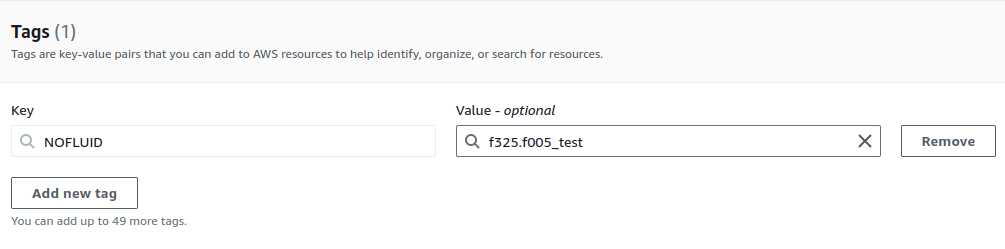
The tag's key must be NOFLUID,
and the value should include the reason for the exclusion
and the code of the weakness
in the following format:
<finding_code>.<finding_code>..._<reason>The following screenshot shows an example:
To read exclusion tags from your resources, ensure the IAM role assumed by the Fluid Attacks scanner has the following permissions:
- iam:ListUsers
- iam:ListUserTags
- iam:ListRoles
- iam:ListRoleTags
- tag:GetResources
See instructions in "AWS IAM role for CodeCommit".
You can define exclusion tags directly in your IaC templates (e.g., Terraform, CloudFormation). This is particularly useful for resources with short lifespans, as it automates the tagging process.
Here is an example:
resource "aws_instance" "example" {
  ami           = "ami-123456"
  instance_type = "t2.micro"

  tags = {
    Name    = "test"
    NOFLUID = "f001.f002_non_relevant"
  }
}
Currently, this feature is not supported for resources that do not allow tags.
Search for vulnerabilities in your apps for free with Fluid Attacks' automated security testing! Start your 21-day free trial and discover the benefits of the Essential plan. If you prefer the Advanced plan, which includes the expertise of Fluid Attacks' pentesting team, fill out this contact form.
Understanding outputs
Guide to understanding security testing reports generated by the Fluid Attacks scanner when used as a standalone tool to find vulnerabilities.
Platform policy sync
Authenticated SAST, SCA, and secrets scans automatically pick up the Git root's path exclusions and the group's severity-breaking threshold from Fluid Attacks' platform.