Fraud risk center
Last updated: Oct 26, 2026
What it is and who it is for
Role required: Fraud Analyst
The Fraud risk center connects two teams that usually work apart: fraud prevention and engineering. It groups your organization's open vulnerabilities into the fraud outcomes they enable. Your fraud-prevention team sees risk in the terms that they use. They can prioritize remediation by the real causes of fraud in the business, not by a raw list of vulnerabilities. The Fraud risk center applies to one organization.
Members with the Fraud Analyst role can access every group in the organization. This access also applies to new groups. A separate authorization for each group is not necessary.
To open the Fraud risk center, log in to the platform. Then click Fraud risk center in the collapsible menu.
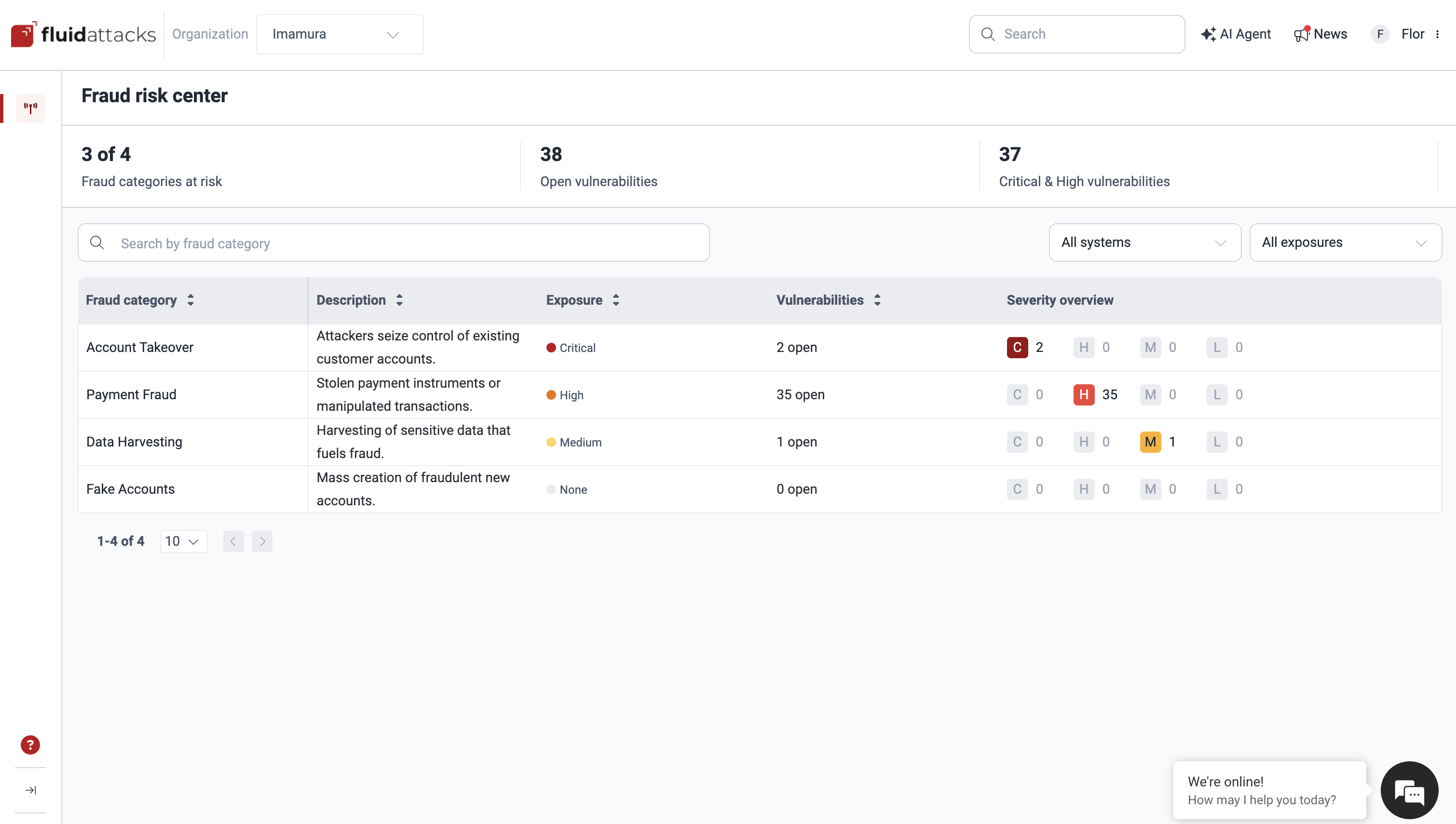
Summary indicators
At the top of the page, three indicators summarize the whole organization:
- Fraud categories at risk: How many of the four fraud categories have open vulnerabilities, shown as "X of Y."
- Open vulnerabilities: Total open vulnerabilities that enable fraud, across all categories.
- Critical & High vulnerabilities: How many of those vulnerabilities are Critical or High severity.
Fraud categories
The Fraud risk center groups vulnerabilities into four fraud categories. All four always appear in the table, also when a category has no open vulnerabilities. Thus, you also see where your organization has no exposure. When a category has no exposed systems, its detail panel shows an empty state: "No open vulnerabilities" / "No system is currently exposed to this fraud category. There is nothing to escalate."
| Category | Description | Fraud impact |
|---|---|---|
| Account Takeover | Attackers seize control of existing customer accounts. | Weaknesses that let an attacker seize control of an existing customer account. This includes credential attacks, authorization flaws (like IDOR to another user's account or funds), authentication bypass, or session and password reset abuse. Once inside, the attacker acts as the victim: moves money, alters data, or drains a wallet. |
| Data Harvesting | Attackers harvest sensitive data that fuels fraud. | Weaknesses that expose sensitive data (PII, payment cards, credentials, or account and financial records) that feed downstream fraud such as identity theft, account takeover, and carding. |
| Payment Fraud | Attackers steal payment instruments or manipulate transactions. | Weaknesses that let an attacker use or validate stolen payment instruments, or manipulate a transaction to move money. This includes carding, card cracking, cashing out, and amount tampering. This results in direct monetary loss. |
| Fake Accounts | Attackers create fraudulent new accounts at scale. | Weaknesses that let attackers create fraudulent new accounts at scale. These accounts fuel bonus abuse, money laundering, and mule networks. |
The category table
The category table lists the four fraud categories, with the most exposed category first. Each row shows:
| Column | What it shows |
|---|---|
| Fraud category | The category name, for example Account Takeover. |
| Description | The short description of the category. |
| Exposure | The category's exposure level (see below). |
| Vulnerabilities | Open vulnerabilities in the category, shown as "N open." |
| Severity overview | The Critical / High / Medium / Low breakdown. |
Above the table, you can search by fraud category. You can also limit the view with the All systems and All exposures filters. If you filter by system, the platform recalculates each category for that system. It does not hide categories. A category with no open vulnerabilities for that system shows an exposure of None. Click a row to open its detail panel.
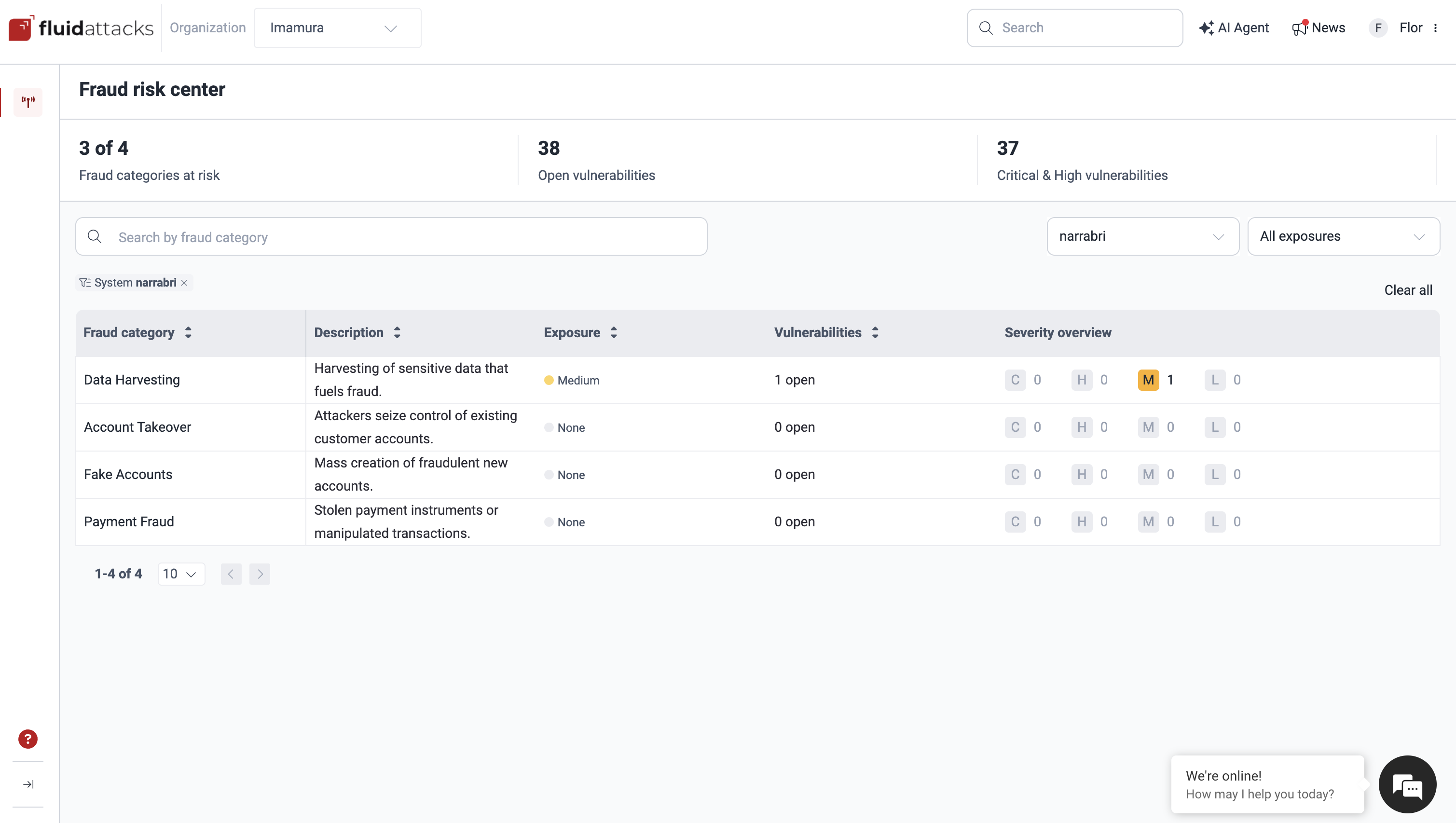
Exposure level
Each category shows an exposure level, equal to the highest severity among its open vulnerabilities:
Critical > High > Medium > Low > None
A category with no open vulnerabilities shows None. The table sorts categories by exposure, with the most exposed category first.
What counts as fraud risk
A vulnerability appears in the Fraud risk center only when it:
- Maps to at least one fraud category.
- Is open and not zero-risk.
- Is reachable from the internet.
- Affects confidentiality or integrity.
This view shows only the vulnerabilities that are exploitable and have real fraud impact. It does not show your full vulnerability backlog.
Category detail panel
Click a category to open its detail panel:
- The category name, with controls to move to the previous or next category.
- FRAUD IMPACT: the full description of the category.
- The category's exposure level.
- Two figures: Affected systems and Open vulnerabilities.
- The list of affected systems.
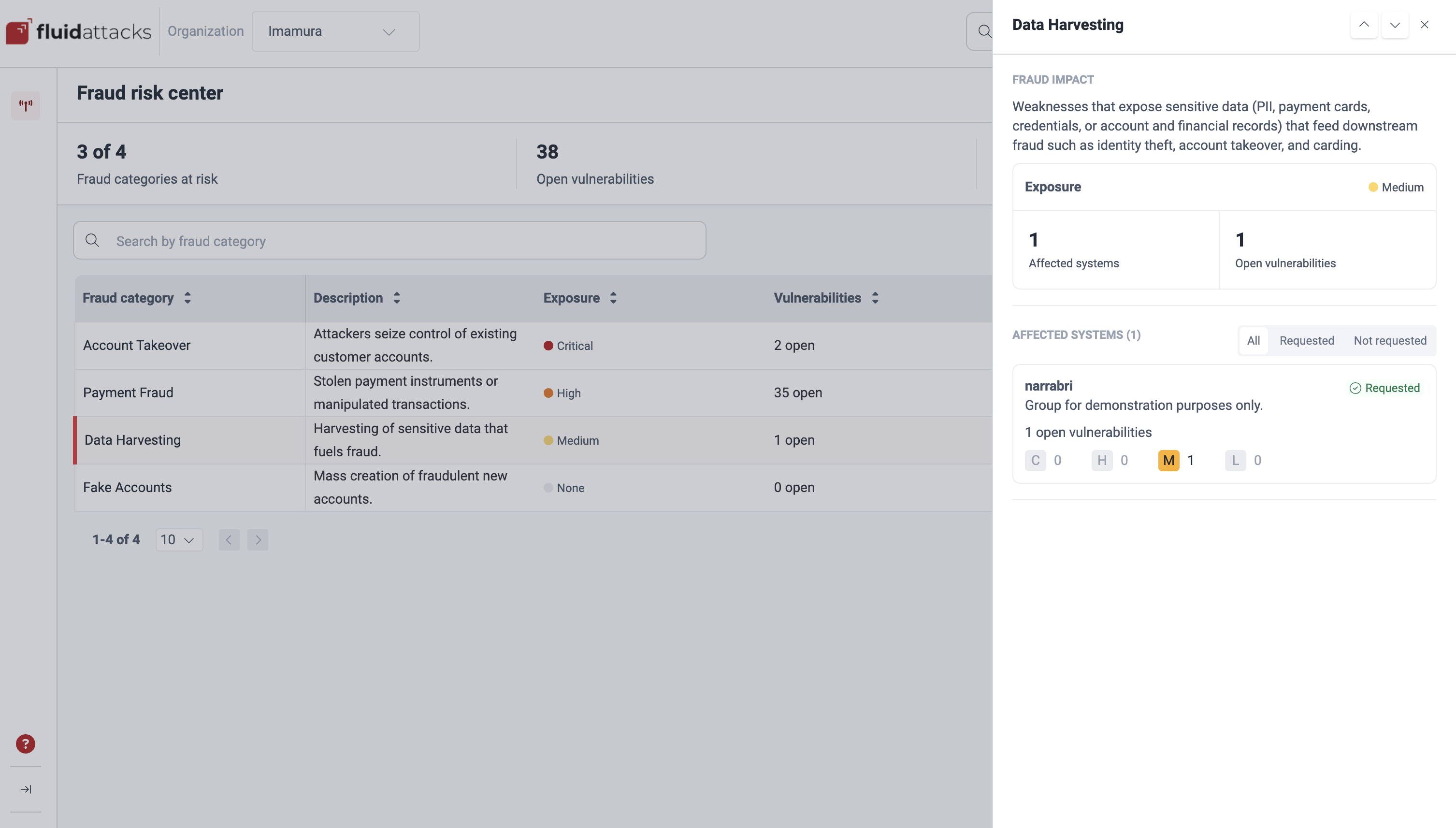
Affected systems
In the panel, the Affected systems section lists the groups exposed to the category, with the most affected group first. The section title shows the count: "Affected systems (N)," or "Affected systems (N of M)" when filtered. Filter the list by request status: All, Requested, or Not requested. If nothing matches the filter, the empty state reads: "No systems to show" / "No affected system matches the selected request status."
For each system, you see:
- The system's name and description.
- The number of open vulnerabilities in that category.
- The severity breakdown.
- An Escalate button, or a Requested tag if a person requested priority before.
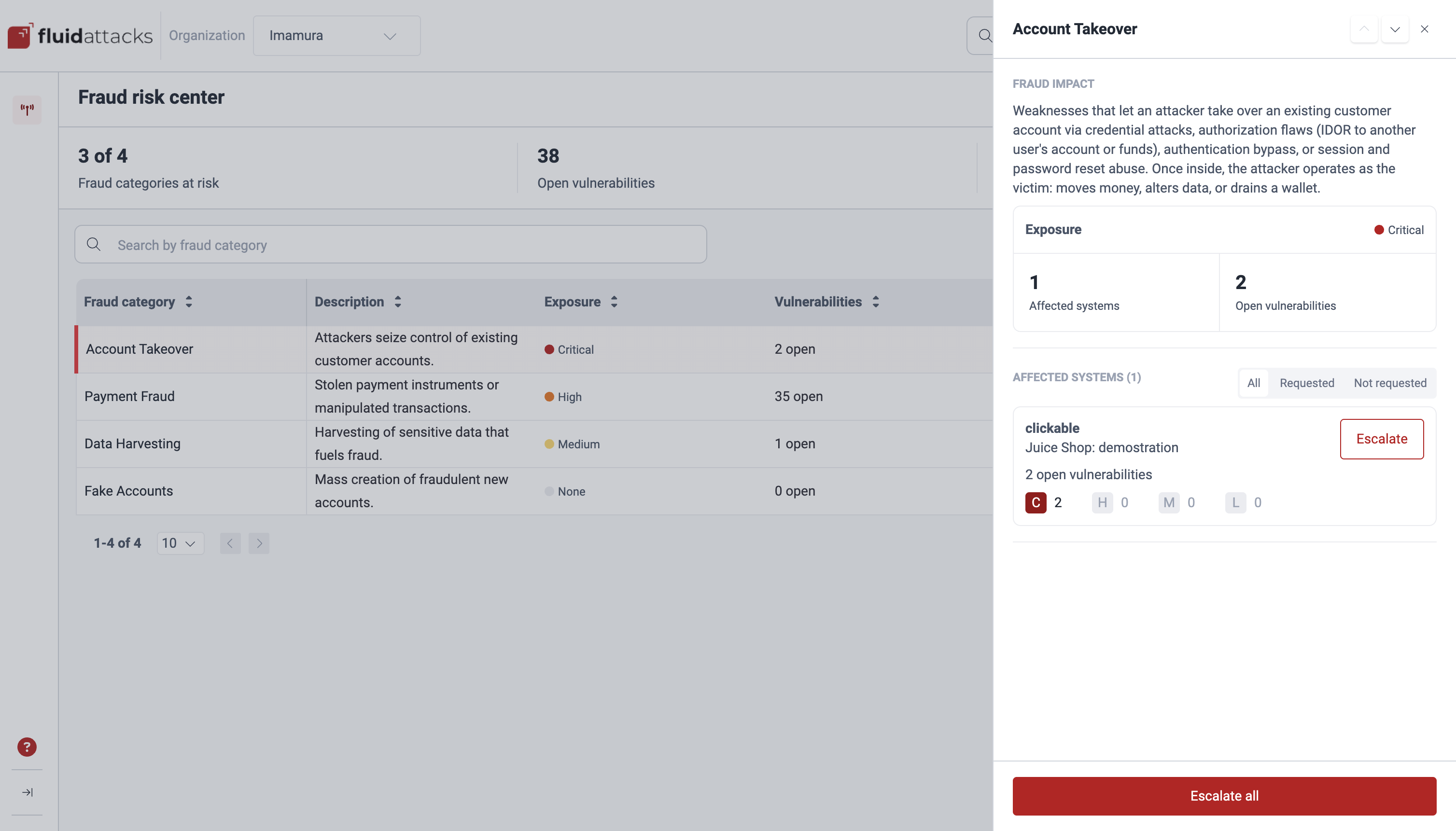
Escalate: request priority remediation
When a fraud risk is urgent, a Fraud Analyst can request priority remediation for it. This does not change the vulnerability. It notifies the responsible contacts of the affected system.
- Escalate one system: Click Escalate on that system.
- Escalate all: Click Escalate all, at the bottom of the panel. This requests priority for all the affected systems in the category at the same time. This button shows only when one or more affected systems are not escalated.
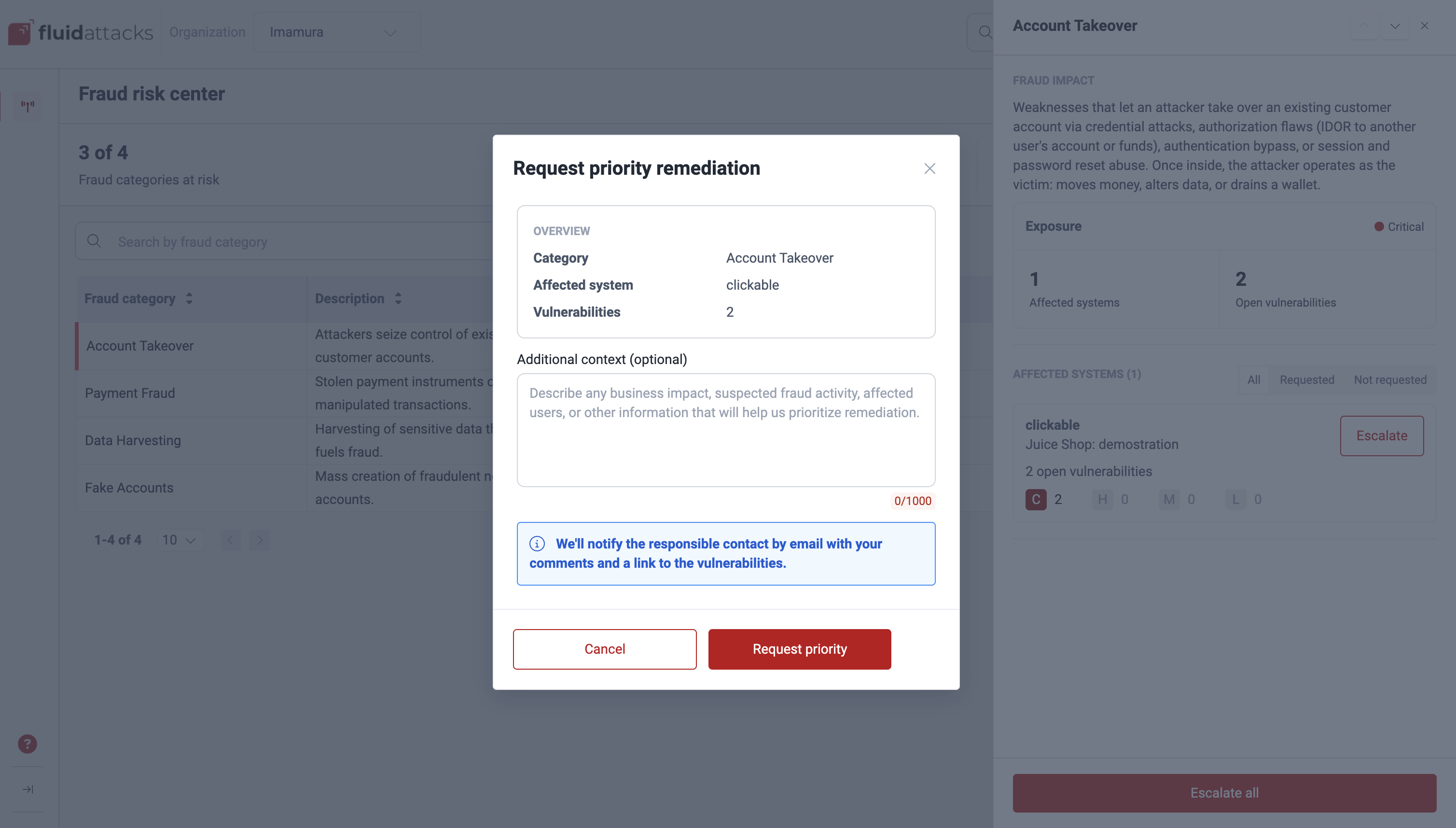
Each action opens the Request priority remediation dialog. Examine the category, affected system (or system count), and vulnerability count. If you want, add context in Additional context (maximum 1,000 characters). Click Request priority to confirm. A confirmation message appears: "Request sent successfully" / "The responsible contacts have been notified by email."
Fluid Attacks emails the responsible contacts of the affected
system, with a copy to you.
The subject line reads [Fraud Risk] Priority remediation requested — <category>.
The email includes the exposure level, the vulnerability
count, up to 10 vulnerable locations,
and a link to the vulnerabilities in the platform.
After you send the request, the system shows the Requested tag. The tag stays after you reload the page.
What the Fraud risk center does not do
The Fraud risk center does not let you remediate, reattack, or apply treatments to vulnerabilities. It only helps you prioritize which fraud risk to escalate. It does not show vulnerability details, such as vulnerable lines of code. The escalation email goes to the responsible contacts of the affected system, with the vulnerable locations. You get these locations only in your copy of that email.
Search for vulnerabilities in your apps for free with Fluid Attacks' automated security testing! Start your 21-day free trial and discover the benefits of the Essential plan. If you prefer the Advanced plan, which includes the expertise of Fluid Attacks' pentesting team, complete this contact form.