Register payment information
Last updated: Jun 30, 2026
Role required: Organization Manager
In the Billing section of an organization, you can register payment information.
Follow these instructions to add a new credit card:
-
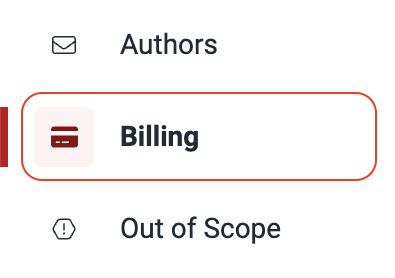
Navigate to the Billing section of your organization from the left-hand collapsible menu.
-
Locate and click on the Payment methods tab.
-
Click on the Add payment method button.
-
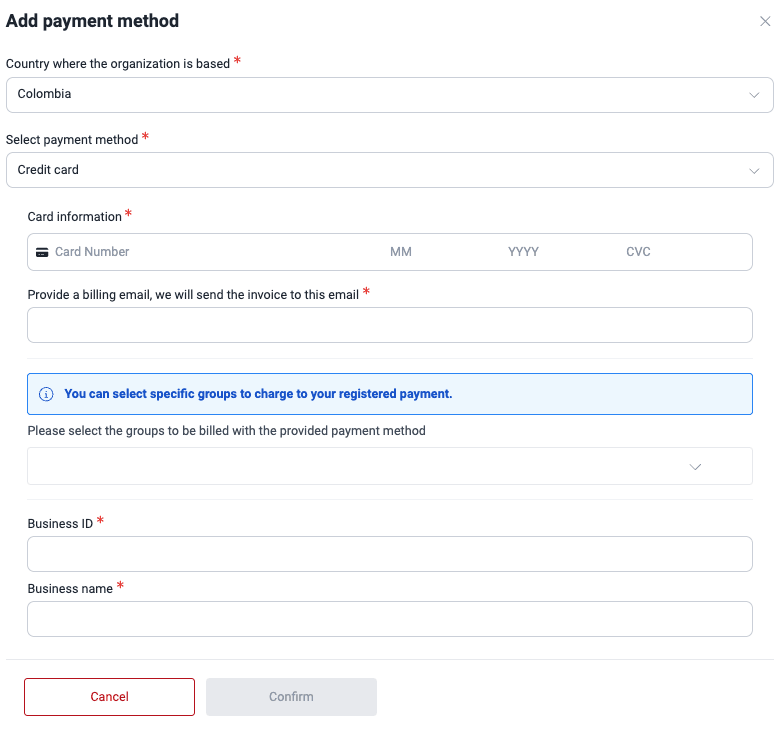
Select the country from which your company operates.
-
Choose the Credit card option.
-
Enter the credit card information and fill out the remaining fields.
-
Click on Confirm.
Remember that you can enjoy a free trial, for which you are not asked for your credit card information.
Search for vulnerabilities in your apps for free with Fluid Attacks' automated security testing! Start your 21-day free trial and discover the benefits of the Essential plan. If you prefer the Advanced plan, which includes the expertise of Fluid Attacks' pentesting team, fill out this contact form.
Portfolios
The Portfolios section on the Fluid Attacks platform enables users to compare analytics information across different groups within the same organization.
Members
Efficiently manage organization and group members on the Fluid Attacks platform, including invitations, role assignments, and removals.