Recent downloads
Last updated: Jun 30, 2026
The Fluid Attacks platform has a menu where you can monitor download status and access the content you have downloaded in the past seven days.
From there, you may access the following requested reports:
- PDF executive and XLS technical vulnerability reports
- ZIP folder with vulnerability reports, compromised records and evidence
- ZIP report of all vulnerabilities in the organization
- PDF and CSV reports of requirements needed to reach compliance
- CSV report of CI Gate's executions
- CSV reports of line, input and language targets of evaluation
- JSON and XML software bill of materials (SBOM)
- CSV reports of HTTP, network and session logs
- PDF security testing certificate
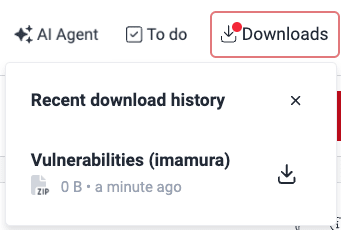
To access this download center, click on Downloads in the platform's header. If you have not downloaded anything recently, the dropdown displays a message telling you so.


When the report you have requested is available, you can see a red dot over Downloads. Click on the menu to display the file and access the download option.
For bigger files, the menu shows the download progress, where
- Queued for processing... indicates the file download request has been queued up, and
- Processing file... indicates the file is currently being processed for downloading.
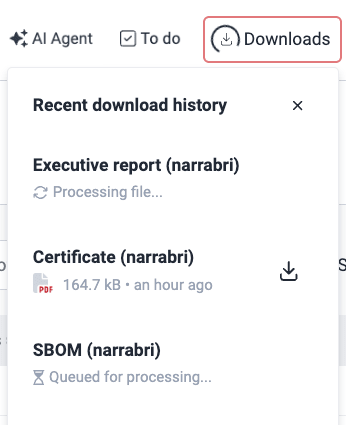
For these files, you get an email notifying you when they are available on the platform.
Search for vulnerabilities in your apps for free with Fluid Attacks' automated security testing! Start your 21-day free trial and discover the benefits of the Essential plan. If you prefer the Advanced plan, which includes the expertise of Fluid Attacks' pentesting team, fill out this contact form.
ZTNA logs
Steps to view and download the HTTP, network and session logs on the Fluid Attacks platform when you have zero trust network access (ZTNA) implemented.
Common analytics
The Fluid Attacks platform provides shared analytics across the organization, groups and portfolios for actionable insights into your security posture.