Skip to Content
logo

Docs

  • Home
  • Quick start
    • FAQ
      • Billing
      • Integrations
      • Platform
      • Scanner
      • Ask our pentesters to explain a vulnerability
      • Fix code with gen AI from the IDE
      • See safe dependency versions
      • Import repositories to test
      • Invite team members to sign up
      • Billing for the Advanced plan
      • Continuous Hacking free trial, plans and pricing
      • Continuous Hacking methodology
      • Continuous Hacking PoV
      • CVSSF metric
      • Glossary
      • Main website
      • Platform demo
      • Tutorial videos
      • What is DAST?
      • What is SAST?
      • What is SCA?
      • Assign vulnerability remediation to a team member
      • See details of the reported security vulnerabilities
    • Sign up to Fluid Attacks
      • Break the build
      • Install CI Gate to break the build
      • Verify whether a fix was successful
  • Find and fix
    • Use the platform
        • Sign-up and login
        • Interface and sections
        • Groups section
        • Group configuration
        • Create and delete groups
        • Create another organization
        • Portfolios
        • ToE and SBOM
        • Register payment method
        • Members
        • Understand roles
        • Group authors
        • Organization authors
        • Repositories
        • Import them with OAuth
        • Repositories out of scope
        • Credentials
        • Environments
        • Resolve events
        • Vulnerabilities section
        • Examine the evidence
        • Supply chain analysis
        • Reachability analysis
        • Vulnerability signature
        • CVSS score adjustment
        • Correlate threat models
        • Assign treatments
        • Assigned tasks
        • Verify with reattacks
        • False positive requests
      • Help options
        • AI Agent
        • Live chat
        • Email
        • Comments
        • Talk to a Pentester
        • Tutorial videos or demo
        • Vulnerability reporting
        • Standard compliance
        • ZTNA logs
        • Recent downloads
        • Common analytics
        • Organization analytics
        • Group analytics
        • Portfolio analytics
        • Chart options
        • CI Gate configuration
        • CI Gate executions
        • Security gates
        • Vulnerability acceptance
        • Prioritization attributes
        • Explore the user menu
        • Enable and disable notifications
        • Subscribe to News
        • Leave a group
      • See vulnerabilities
        • Fluid Attacks' scanners
        • OWASP Benchmark results
        • Your feedback
      • Use the scanners
        • Local run
        • CI/CD integration
        • Understanding outputs
        • Findings exclusion
      • Use a configuration file
        • SAST scanner
        • SCA scanner
        • DAST scanner
        • APK scanner
      • Automatic remediation
      • Custom remediation guides
      • Introduction to Sorts
      • Sorts user guide
      • Connection mechanisms
      • Cloud connection
      • Egress connection
      • Connector connection
      • Types of authentication
      • AWS CodeCommit
    • Service-level agreement
      • Availability SLA
      • Response SLA
      • Accuracy SLA
      • False negatives
      • False positives
      • Scope
    • Support information
      • Changelog
        • 2023
        • 2024
        • 2025
        • 2026
      • Roadmap
      • AI functions
      • Attack surfaces
      • Binaries
      • Browsers
      • CI/CD
      • Clouds
      • CVEs for reachability
      • Evidence formats
      • Frameworks
      • IDE functionalities
      • Languages
      • Languages for fixes
      • Package managers
      • Remediation
      • SCM systems
      • Secrets
      • Standards
      • Ticketing systems
      • Documentation sections
  • Integrations
      • Bug-tracking systems
      • Tools and integrations
      • Access Talk to a Pentester and help from Jira issues
      • Automate Jira issue creation
      • Create Jira issues for vulnerabilities
      • Go to vulnerability evidence and more from Jira issues
      • Install the Fluid Attacks app for Jira Cloud
      • Link vulnerabilities to Jira issues or unlink them
      • Request reattacks from Jira issues
      • Set up the Jira integration
      • Set up the Azure DevOps integration
      • Set up the GitLab integration
    • VS Code
      • Functions
      • Troubleshooting
      • Identify and address vulnerabilities from IntelliJ
      • Install the IntelliJ plugin
      • Identify and address vulnerabilities from Cursor
      • Install the Cursor extension
      • AWS Marketplace integration
    • MCP server
      • Installation
      • Capabilities and use cases
      • Docker installation
    • PR/MR scanner
      • For GitLab
      • For Azure DevOps
      • Troubleshooting
      • File exclusion
    • API
      • Learn the basics
    • Webhooks
  • Stack
      • Bash
      • Python
      • Terraform
      • TypeScript
      • Ariadne
      • Commitlint
      • D3
      • Docker
      • ESLint
      • GraphQL
      • Hypercorn
      • Kubernetes
      • Labels
      • Mypy
      • Nix Flakes
      • Platform audit logs
      • Platform authentication
      • Platform authorization
      • Pydantic
      • Pydantic AI
      • React
      • Ruff
      • Sops
      • Starlette
      • Tree-sitter
      • Visual Studio Code
      • AWS
      • Batch
      • Bedrock
      • BigCodeBench
      • BugSnag
      • Checkly
      • Claude 3.5 Sonnet
      • Cloudflare
      • CloudWatch
      • Cost Management
      • Datadog
      • dbt
      • DynamoDB
      • EBS
      • EC2
      • EKS
      • ELB
      • Engineering metrics
      • ePayco
      • EventBridge
      • GitLab
      • GitLab CI
      • Google Workspace
      • IAM
      • Jamf
      • KMS
      • Lambda
      • LogRocket
      • Okta
      • OpenAI
      • OpenSearch
      • Organizations
      • QuickSight
      • S3
      • SageMaker
      • Snowflake
      • Statuspage
      • Step Functions
      • Stripe
      • Treli
      • Ubiquiti
      • Vanta
      • Voyage AI
      • VPC
      • VPN
      • Zoho One
      • Zoho Sign
    • Pentesting tools
  • Compliance
    • Authentication
      • Clients
      • Password policies
      • Staff
    • Authorization
      • Access revocation
      • Clients
      • Employee termination
      • Endpoints
      • Secret rotation
      • Sessions
      • Staff
    • Availability
      • Distributed apps
      • Distributed firewall
      • Everything backed up
      • Multiple zones
      • Recovery objective
    • Confidentiality
      • Device (re)enrolling
      • Direct hiring
      • Encryption at rest
      • Encryption in transit
      • No personal gain
      • Personnel NDA
      • Secure deletion
    • Integrity
      • Applicant evaluation
      • Awareness
      • Certification Hub
      • Certified cloud provider
      • Certified security analysts
      • Comprehensive reporting
      • Developing for integrity
      • Monitoring
      • Production data isolation
      • Secure emails
      • SLSA compliance
      • Standard timezone
      • Static website
      • Training plan
    • Non-repudiation
      • Everything as code
      • Extensive logs
    • Privacy
      • Data privacy policy
      • Data retention policy
      • Data use policy
      • Email obfuscation
      • Time tracking
      • Manual for the NDR
      • Subprocessor OpenAI
      • OTR messaging
      • Polygraph tests
      • Project pseudonymization
      • Data transmission
      • Unsubscribe email
      • Use of cookies
    • Resilience
      • Continuity and recovery
      • Equipment and telecommuting
      • Everything is decentralized
      • Redundant roles
    • Transparency
      • Complaint management
      • Data leakage policy
      • Ethics hotline
      • Help channel
      • Incident management
      • Information security responsibility
      • Open source
      • Quality policy
      • Status page
      • Testing our technology
      • Vulnerability releasing
  • Compare
    • 42Crunch
    • 7 Way Security
    • Aikido
    • Anvil Secure
    • Apiiro
    • AppCheck
    • Appdome
    • Appknox
    • Aqua
    • Armorcode
    • Arnica
    • Astra
    • Backslash
    • Base4
    • Bishop Fox
    • Black Duck
    • Black Hills
    • Breachlock
    • Bright Security
    • Burp Suite
    • Checkmarx
    • CloudGuard
    • Cobalt
    • Codacy
    • Conviso
    • Cure53
    • Cycode
    • Cyscope
    • Cyver
    • Data Theorem
    • DataDog
    • DeepSource
    • DefectDojo
    • Detectify
    • Devel
    • Dynatrace
    • Edgescan
    • Endor Labs
    • Escape
    • Evolve Security
    • Faraday Security
    • FortiDevSec
    • Fortify
    • GitHub Advanced Security (GHAS)
    • Ghost Security
    • GitLab Ultimate
    • GuardRails
    • HackerOne
    • Hackmetrix
    • Hadrian
    • HCL AppScan
    • Heeler
    • Hopper Security
    • ImmuniWeb
    • Inspectiv
    • Intigriti
    • Intruder
    • Invicti
    • JFrog
    • Jit
    • Kiuwan
    • Legit Security
    • Mandiant
    • Mend
    • Mindgard
    • Moderne
    • NetSPI
    • NowSecure
    • Nucleus Security
    • Oligo Security
    • Orca Security
    • Oversecured
    • OX Security
    • Phoenix Security
    • PlexTrac
    • Praetorian
    • Prancer
    • Prisma Cloud
    • Probely
    • Prowler
    • ReversingLabs
    • RunSybil
    • Runzero
    • Safety
    • Securitum
    • Seemplicity
    • Semgrep
    • Snyk
    • Socket
    • SonarQube
    • Sonatype Lifecycle
    • SOOS
    • StackHawk
    • Strike
    • Synacktiv
    • Tenable Nessus
    • ThreatModeler
    • Veracode
    • White Jaguars
    • Wiz
    • Xygeni
    • ZAP
    • ZeroPath

  • Log in to the platform 
  • Home
  • Quick start
    • FAQ
      • Billing
      • Integrations
      • Platform
      • Scanner
      • Ask our pentesters to explain a vulnerability
      • Fix code with gen AI from the IDE
      • See safe dependency versions
      • Import repositories to test
      • Invite team members to sign up
      • Billing for the Advanced plan
      • Continuous Hacking free trial, plans and pricing
      • Continuous Hacking methodology
      • Continuous Hacking PoV
      • CVSSF metric
      • Glossary
      • Main website
      • Platform demo
      • Tutorial videos
      • What is DAST?
      • What is SAST?
      • What is SCA?
      • Assign vulnerability remediation to a team member
      • See details of the reported security vulnerabilities
    • Sign up to Fluid Attacks
      • Break the build
      • Install CI Gate to break the build
      • Verify whether a fix was successful
  • Find and fix
    • Use the platform
        • Sign-up and login
        • Interface and sections
        • Groups section
        • Group configuration
        • Create and delete groups
        • Create another organization
        • Portfolios
        • ToE and SBOM
        • Register payment method
        • Members
        • Understand roles
        • Group authors
        • Organization authors
        • Repositories
        • Import them with OAuth
        • Repositories out of scope
        • Credentials
        • Environments
        • Resolve events
        • Vulnerabilities section
        • Examine the evidence
        • Supply chain analysis
        • Reachability analysis
        • Vulnerability signature
        • CVSS score adjustment
        • Correlate threat models
        • Assign treatments
        • Assigned tasks
        • Verify with reattacks
        • False positive requests
      • Help options
        • AI Agent
        • Live chat
        • Email
        • Comments
        • Talk to a Pentester
        • Tutorial videos or demo
        • Vulnerability reporting
        • Standard compliance
        • ZTNA logs
        • Recent downloads
        • Common analytics
        • Organization analytics
        • Group analytics
        • Portfolio analytics
        • Chart options
        • CI Gate configuration
        • CI Gate executions
        • Security gates
        • Vulnerability acceptance
        • Prioritization attributes
        • Explore the user menu
        • Enable and disable notifications
        • Subscribe to News
        • Leave a group
      • See vulnerabilities
        • Fluid Attacks' scanners
        • OWASP Benchmark results
        • Your feedback
      • Use the scanners
        • Local run
        • CI/CD integration
        • Understanding outputs
        • Findings exclusion
      • Use a configuration file
        • SAST scanner
        • SCA scanner
        • DAST scanner
        • APK scanner
      • Automatic remediation
      • Custom remediation guides
      • Introduction to Sorts
      • Sorts user guide
      • Connection mechanisms
      • Cloud connection
      • Egress connection
      • Connector connection
      • Types of authentication
      • AWS CodeCommit
    • Service-level agreement
      • Availability SLA
      • Response SLA
      • Accuracy SLA
      • False negatives
      • False positives
      • Scope
    • Support information
      • Changelog
        • 2023
        • 2024
        • 2025
        • 2026
      • Roadmap
      • AI functions
      • Attack surfaces
      • Binaries
      • Browsers
      • CI/CD
      • Clouds
      • CVEs for reachability
      • Evidence formats
      • Frameworks
      • IDE functionalities
      • Languages
      • Languages for fixes
      • Package managers
      • Remediation
      • SCM systems
      • Secrets
      • Standards
      • Ticketing systems
      • Documentation sections
  • Integrations
      • Bug-tracking systems
      • Tools and integrations
      • Access Talk to a Pentester and help from Jira issues
      • Automate Jira issue creation
      • Create Jira issues for vulnerabilities
      • Go to vulnerability evidence and more from Jira issues
      • Install the Fluid Attacks app for Jira Cloud
      • Link vulnerabilities to Jira issues or unlink them
      • Request reattacks from Jira issues
      • Set up the Jira integration
      • Set up the Azure DevOps integration
      • Set up the GitLab integration
    • VS Code
      • Functions
      • Troubleshooting
      • Identify and address vulnerabilities from IntelliJ
      • Install the IntelliJ plugin
      • Identify and address vulnerabilities from Cursor
      • Install the Cursor extension
      • AWS Marketplace integration
    • MCP server
      • Installation
      • Capabilities and use cases
      • Docker installation
    • PR/MR scanner
      • For GitLab
      • For Azure DevOps
      • Troubleshooting
      • File exclusion
    • API
      • Learn the basics
    • Webhooks
  • Stack
      • Bash
      • Python
      • Terraform
      • TypeScript
      • Ariadne
      • Commitlint
      • D3
      • Docker
      • ESLint
      • GraphQL
      • Hypercorn
      • Kubernetes
      • Labels
      • Mypy
      • Nix Flakes
      • Platform audit logs
      • Platform authentication
      • Platform authorization
      • Pydantic
      • Pydantic AI
      • React
      • Ruff
      • Sops
      • Starlette
      • Tree-sitter
      • Visual Studio Code
      • AWS
      • Batch
      • Bedrock
      • BigCodeBench
      • BugSnag
      • Checkly
      • Claude 3.5 Sonnet
      • Cloudflare
      • CloudWatch
      • Cost Management
      • Datadog
      • dbt
      • DynamoDB
      • EBS
      • EC2
      • EKS
      • ELB
      • Engineering metrics
      • ePayco
      • EventBridge
      • GitLab
      • GitLab CI
      • Google Workspace
      • IAM
      • Jamf
      • KMS
      • Lambda
      • LogRocket
      • Okta
      • OpenAI
      • OpenSearch
      • Organizations
      • QuickSight
      • S3
      • SageMaker
      • Snowflake
      • Statuspage
      • Step Functions
      • Stripe
      • Treli
      • Ubiquiti
      • Vanta
      • Voyage AI
      • VPC
      • VPN
      • Zoho One
      • Zoho Sign
    • Pentesting tools
  • Compliance
    • Authentication
      • Clients
      • Password policies
      • Staff
    • Authorization
      • Access revocation
      • Clients
      • Employee termination
      • Endpoints
      • Secret rotation
      • Sessions
      • Staff
    • Availability
      • Distributed apps
      • Distributed firewall
      • Everything backed up
      • Multiple zones
      • Recovery objective
    • Confidentiality
      • Device (re)enrolling
      • Direct hiring
      • Encryption at rest
      • Encryption in transit
      • No personal gain
      • Personnel NDA
      • Secure deletion
    • Integrity
      • Applicant evaluation
      • Awareness
      • Certification Hub
      • Certified cloud provider
      • Certified security analysts
      • Comprehensive reporting
      • Developing for integrity
      • Monitoring
      • Production data isolation
      • Secure emails
      • SLSA compliance
      • Standard timezone
      • Static website
      • Training plan
    • Non-repudiation
      • Everything as code
      • Extensive logs
    • Privacy
      • Data privacy policy
      • Data retention policy
      • Data use policy
      • Email obfuscation
      • Time tracking
      • Manual for the NDR
      • Subprocessor OpenAI
      • OTR messaging
      • Polygraph tests
      • Project pseudonymization
      • Data transmission
      • Unsubscribe email
      • Use of cookies
    • Resilience
      • Continuity and recovery
      • Equipment and telecommuting
      • Everything is decentralized
      • Redundant roles
    • Transparency
      • Complaint management
      • Data leakage policy
      • Ethics hotline
      • Help channel
      • Incident management
      • Information security responsibility
      • Open source
      • Quality policy
      • Status page
      • Testing our technology
      • Vulnerability releasing
  • Compare
    • 42Crunch
    • 7 Way Security
    • Aikido
    • Anvil Secure
    • Apiiro
    • AppCheck
    • Appdome
    • Appknox
    • Aqua
    • Armorcode
    • Arnica
    • Astra
    • Backslash
    • Base4
    • Bishop Fox
    • Black Duck
    • Black Hills
    • Breachlock
    • Bright Security
    • Burp Suite
    • Checkmarx
    • CloudGuard
    • Cobalt
    • Codacy
    • Conviso
    • Cure53
    • Cycode
    • Cyscope
    • Cyver
    • Data Theorem
    • DataDog
    • DeepSource
    • DefectDojo
    • Detectify
    • Devel
    • Dynatrace
    • Edgescan
    • Endor Labs
    • Escape
    • Evolve Security
    • Faraday Security
    • FortiDevSec
    • Fortify
    • GitHub Advanced Security (GHAS)
    • Ghost Security
    • GitLab Ultimate
    • GuardRails
    • HackerOne
    • Hackmetrix
    • Hadrian
    • HCL AppScan
    • Heeler
    • Hopper Security
    • ImmuniWeb
    • Inspectiv
    • Intigriti
    • Intruder
    • Invicti
    • JFrog
    • Jit
    • Kiuwan
    • Legit Security
    • Mandiant
    • Mend
    • Mindgard
    • Moderne
    • NetSPI
    • NowSecure
    • Nucleus Security
    • Oligo Security
    • Orca Security
    • Oversecured
    • OX Security
    • Phoenix Security
    • PlexTrac
    • Praetorian
    • Prancer
    • Prisma Cloud
    • Probely
    • Prowler
    • ReversingLabs
    • RunSybil
    • Runzero
    • Safety
    • Securitum
    • Seemplicity
    • Semgrep
    • Snyk
    • Socket
    • SonarQube
    • Sonatype Lifecycle
    • SOOS
    • StackHawk
    • Strike
    • Synacktiv
    • Tenable Nessus
    • ThreatModeler
    • Veracode
    • White Jaguars
    • Wiz
    • Xygeni
    • ZAP
    • ZeroPath

  • Log in to the platform 

On This Page

  • See the threat matches
  • Manage threat model files
  • Upload threat model files
  • Delete threat model files
Find and fixUse the platformManage vulnerabilitiesCorrelate threat models

Correlate your threat model to vulnerabilities

Last updated: Mar 2, 2026

The Design Map section provides you with a correlation between your threat model and the vulnerabilities Fluid Attacks has detected in your system. These threat matches are shown to you irrespective of whether such vulnerabilities have a ‘Vulnerable’ or ‘Safe’ status. Thanks to the information in this section, you can prioritize vulnerability remediation strategically, focusing on those flaws that pose the greatest risk to your business as defined by your threat model.
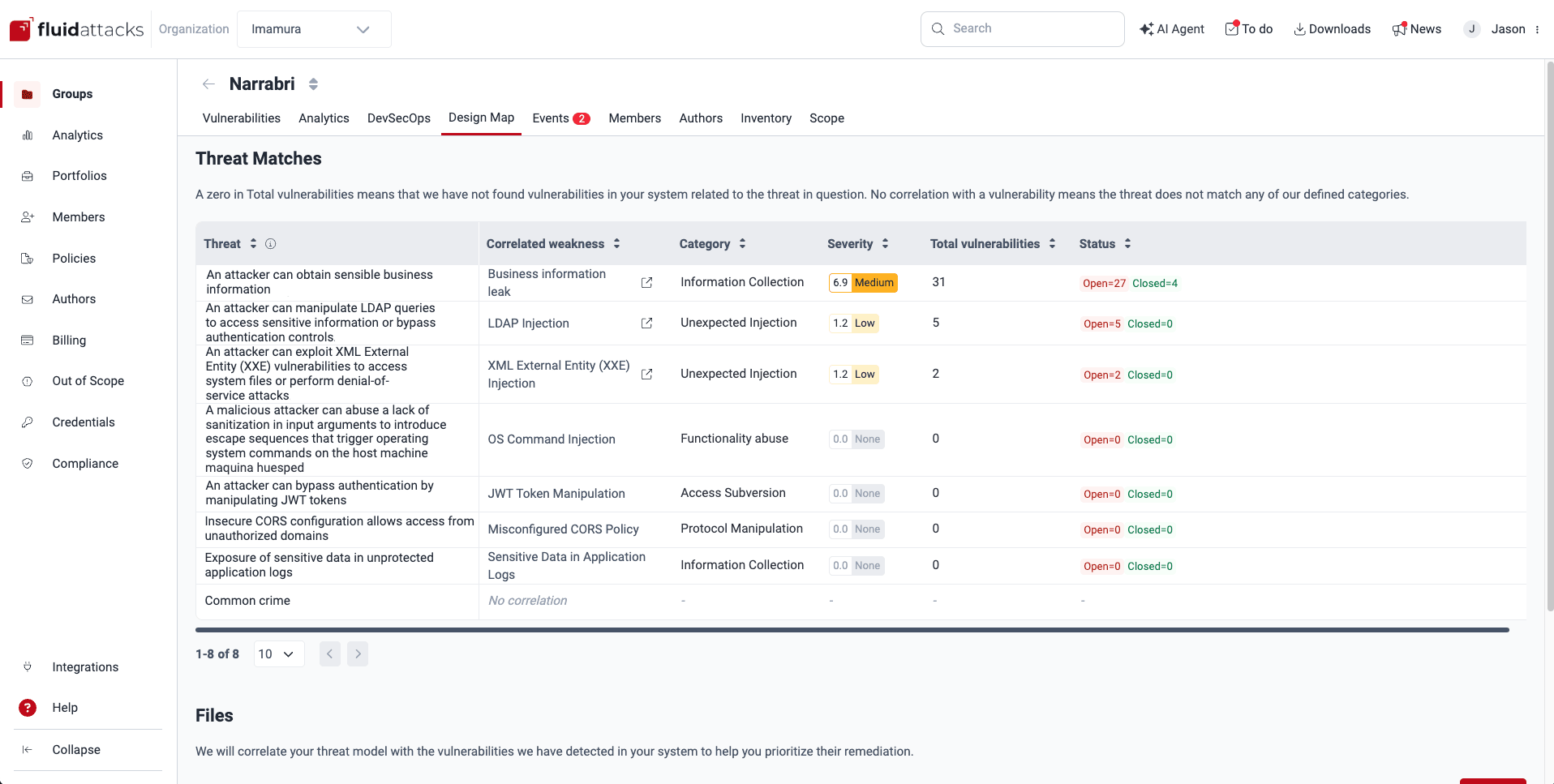
Correlate your threat model on the Fluid Attacks platform

See the threat matches

Role  required: User, Vulnerability Manager or Group Manager

Once Fluid Attacks has analyzed the appropriately formatted file (s) you have provided detailing your threat model, the table in Threat Matches shows you the following information:

  • Threat: The detailed descriptions of threats to your business as provided in your model
  • Correlated weakness: The vulnerabilities from Fluid Attacks’ categorization whose descriptions match those of the threats in your model

The value ‘No correlation’ means that the threat does not match any of Fluid Attacks’ defined categories.

  • Category: The names of the categories  where Fluid Attacks has included the weaknesses
  • Severity: The default CVSS scores Fluid Attacks has assigned to the related vulnerabilities
  • Total vulnerabilities: The total paths in your system where the weaknesses have been present

A zero in Total vulnerabilities means that Fluid Attacks has not found vulnerabilities in your system related to the threat in question.

  • Status: Total vulnerabilities by their Status:
  • Closed: Vulnerabilities that are no longer present
  • Open: Vulnerabilities that are present

Fluid Attacks applies your threat model to the entire group, not to specific components.

Manage threat model files

Role  required: User, Vulnerability Manager or Group Manager

You need to upload at least one correctly formatted spreadsheet detailing your threat model so that Fluid Attacks can do the correlation with the reported vulnerabilities. The name(s), description(s) and upload date(s) of those resources are shown in the table under Files.
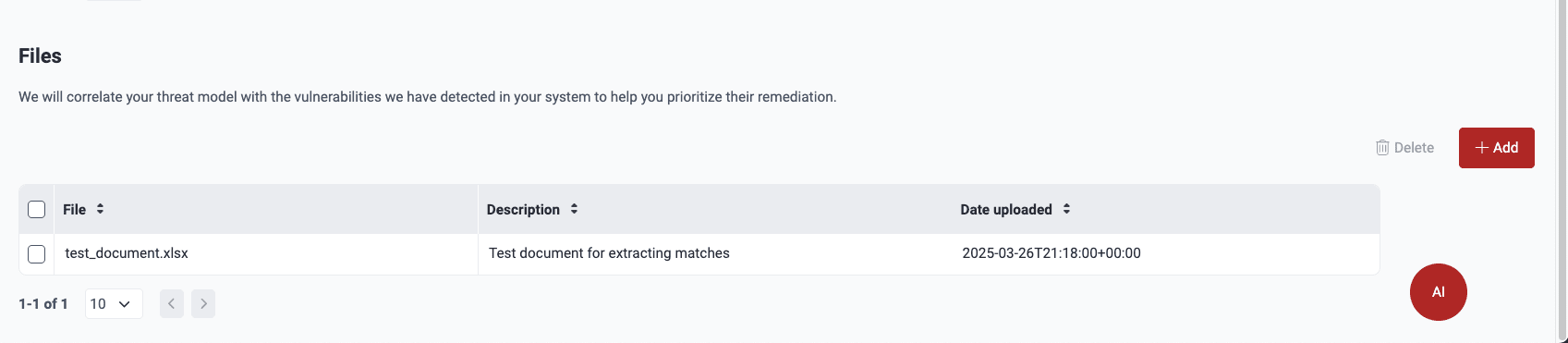
View threat model files on the Fluid Attacks platform
  1. File: The spreadsheet’s name
  2. Description: Your team’s concise account of the file’s content
  3. Date uploaded: When the spreadsheet was added to the platform

Upload threat model files

File requirements:

  1. The file you upload must be a spreadsheet with the .xlsx or .xls extension. No other kind of file is supported.
  2. Threat descriptions in the spreadsheet must be organized vertically, in the same column(s). Fluid Attacks’ analysis takes into account each column with relevant threat descriptions across the sheets in your file.
  3. The file must indeed have threat descriptions. If you, for example, add a spreadsheet that only lists security requirements, the analysis is not performed.

Make sure your files meet the above requirements. Otherwise, you are shown the ‘processing’ message endlessly.

Give the threat-related column an obvious name, such as one including the word “threat.” When you have a spreadsheet with your threat model that is appropriately formatted, you can add it by following these steps:

  1. Navigate to Design Map.

  2. Click on the Add/Add file button.

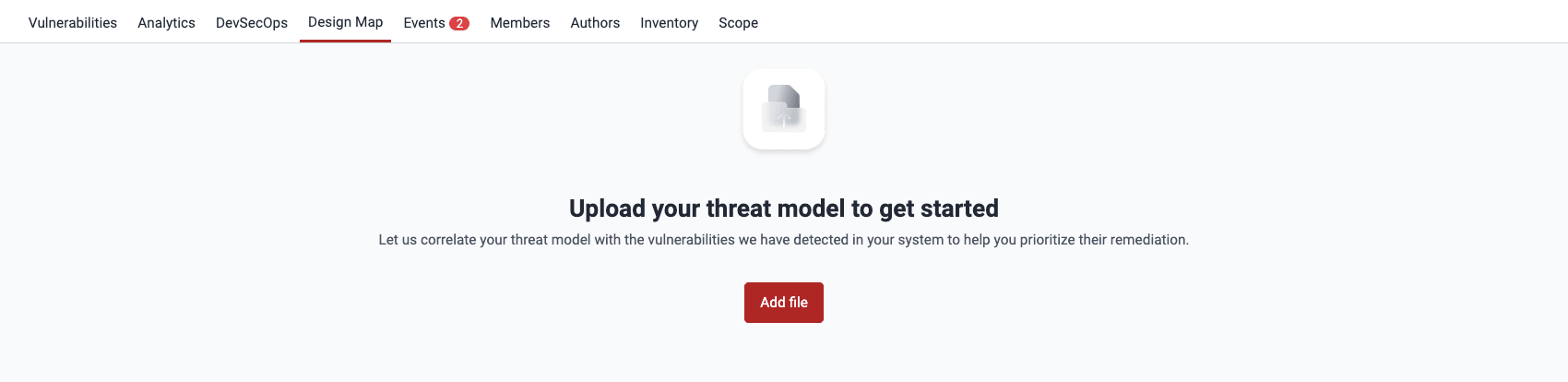
    Find option to upload a threat model on the Fluid Attacks platform
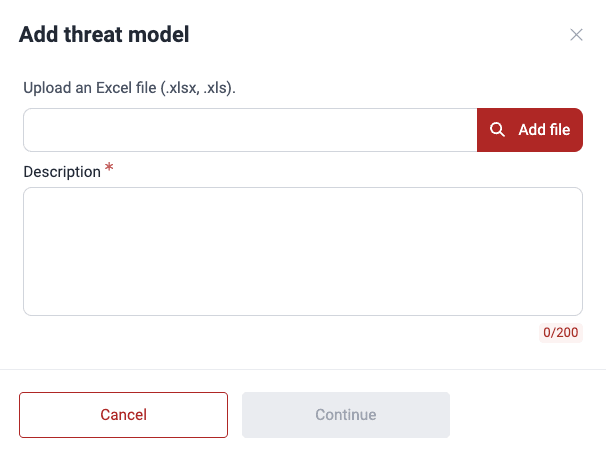
  3. Upload a spreadsheet with the .xlsx or .xls extension and write a brief description of the file’s contents (maximum 200 characters).

    Add a threat model on the Fluid Attacks platform
  4. Click on Continue.

When the analysis is done, you can see the results under Threat Matches .

Delete threat model files

When you delete a threat model file, threat matches are recalculated using any remaining file.

Follow these steps to delete threat model files:

  1. Navigate to Design Map.

  2. Under Files, select the file(s) using the checkbox(es) and click on the Delete button.
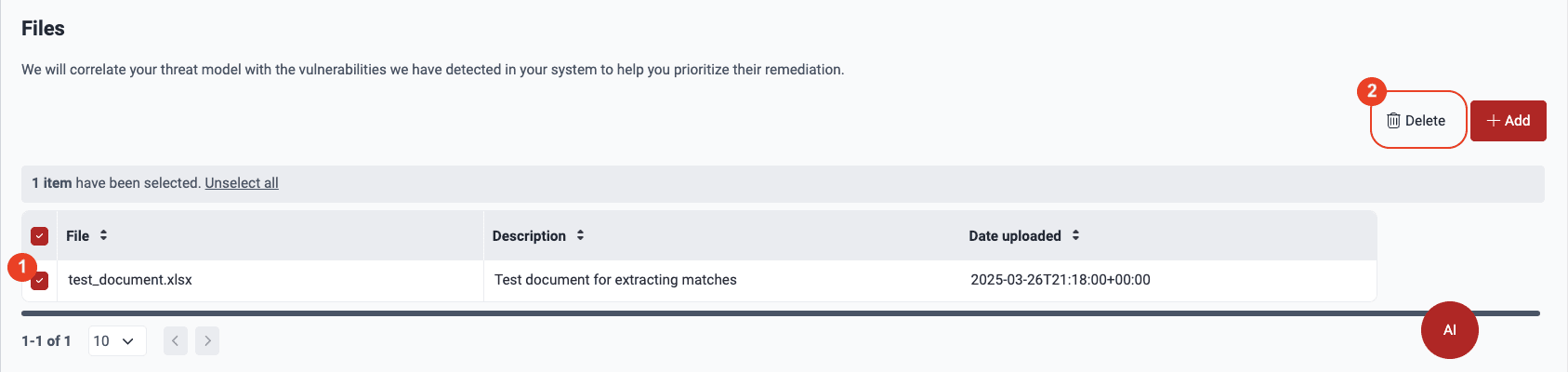
    Delete a threat model on the Fluid Attacks platform
  3. Acknowledge that you understand that once the file is removed, threat matches are recalculated with any files left. Click on the checkbox and then Confirm.
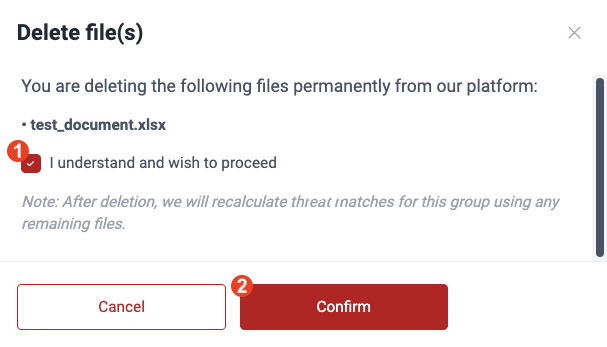
    Delete a threat model file on the Fluid Attacks platform

Have questions about the security of your data? Get some answers in this Data security and privacy  section.

Free trial Search for vulnerabilities in your apps for free with Fluid Attacks’ automated security testing! Start your 21-day free trial  and discover the benefits of the Continuous Hacking  Essential plan . If you prefer the Advanced plan, which includes the expertise of Fluid Attacks’ hacking team, fill out this contact form .

CVSS score adjustmentAssign treatments

Fluid Attacks 2026. All rights reserved.