Methodology
Last updated: Oct 26, 2026
Description
The Fluid Attacks solution combines its artificial intelligence (AI), application security testing tools, and a team of pentesters. With this combination, Fluid Attacks finds security vulnerabilities accurately during the software development lifecycle (SDLC). It also helps you remediate them and makes sure that your deployments are secure.
Fluid Attacks reports the risk exposure to its clients quickly. It helps them get high remediation rates and give high-quality and safe products to their end users. The Fluid Attacks security testing uses these techniques:
- Static application security testing (SAST)
- Dynamic application security testing (DAST)
- Software composition analysis (SCA)
- Cloud security posture management (CSPM)
- Mobile application security testing (MAST)
- Secret scanning (SS)
- Container scanning (CS)
- Secure code review (SCR)
- Penetration testing as a service (PTaaS)
- Reverse engineering (RE)
- AI SAST
Fluid Attacks also uses its own AI tool to sort the files in a code repository by their probability of having security vulnerabilities. Thus, the Fluid Attacks pentesters know which files to test first and find vulnerabilities faster.
Fluid Attacks detects vulnerabilities accurately in continuous cycles. Each cycle has these steps:
- Automated attack: The automated tools of Fluid Attacks scan your system and report the common vulnerabilities, with low false positive rates. The tools use these techniques: SAST, Web DAST, API DAST, SCA, CSPM, MAST, SS, and CS. Also, Fluid Attacks has one more AI-powered tool for more advanced SAST.
- AI-powered triage: Fluid Attacks trains its AI with thousands of snippets of vulnerable code. A dedicated module helps prioritize the files that can be vulnerable for review.
- Manual security testing: The Fluid Attacks team of pentesters has many certifications. It continuously examines code, infrastructure, and applications to find security vulnerabilities. The team uses secure code review, PTaaS, and reverse engineering.
- Release process: The Fluid Attacks experts examine the findings, remove possible false positives, and make sure that the results are correct.
- Escapes validation: The Fluid Attacks experts try to decrease the false negatives. They search for vulnerabilities more deeply.
- Pruning: The Fluid Attacks experts find the false positives in the reports of tools and humans. Thus, they remove this noise at its source so that it does not occur again.
- GenAI-assisted remediation: The AI-powered Autofix and Custom Fix options are available in the IDE extensions and on the platform. With these options, you can remediate vulnerabilities in the code quickly.
- Reattack: The Fluid Attacks experts examine if your fixes work and if the fixes caused new vulnerabilities.
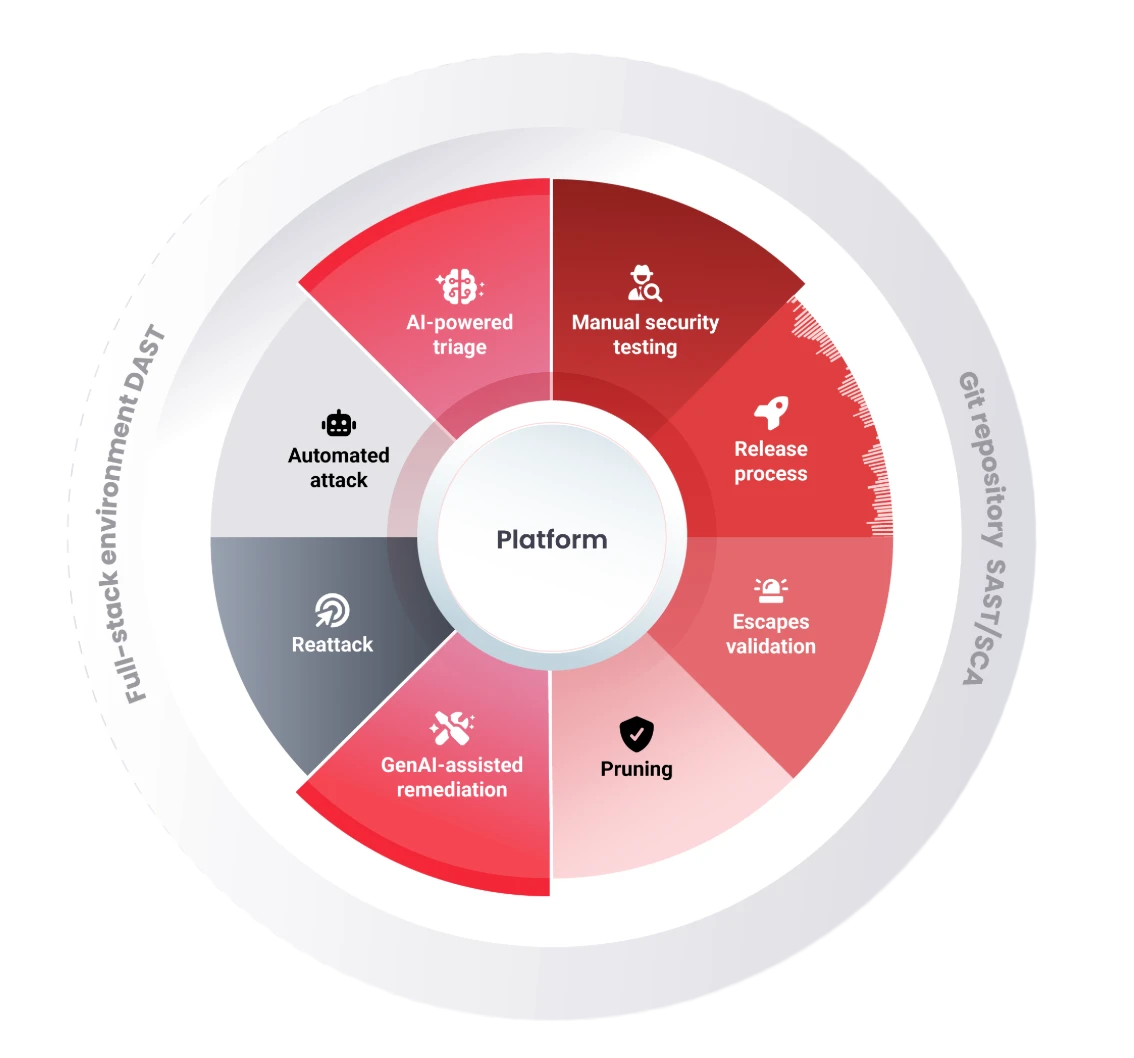
Fluid Attacks helps you develop secure software and deploy it safely to production. To make sure that the development is secure, Fluid Attacks does tests during all of the SDLC. Fluid Attacks reports all the findings from its tool and its pentesters on its platform. On the platform, you can do these vulnerability management tasks:
- See the lines of code that have vulnerabilities.
- Find links to documentation with examples of compliant code.
- Control the remediation process.
- Request retests to make sure that the fixes work.
- Monitor your progress in risk mitigation.
To help developers add vulnerability management to their workflow easily, Fluid Attacks has integrations with different tools that developers frequently use.
To help you remediate vulnerabilities, Fluid Attacks gives you custom and automated fixes that AI generates from its platform and its VS Code extension. Also, with the "Talk to a Pentester" feature, you can meet with an expert who helps you understand vulnerabilities. Fluid Attacks also has a CI Gate that stops the deployment of software versions with unmanaged vulnerabilities. Thus, the CI Gate helps you make the development team obey your policies and fix the software security issues. To learn about the different plans, read free trial, plans and pricing.
Needed supplies
- Version control system with Git technology
- Internet access to code repositories, with read and clone privileges (if the access is through a private network, the correct configuration and credentials for that network are necessary)
- URLs of the environments to test, installers of the mobile apps to test (.apk, .ipa), or both
- Access credentials to each application (for each role to test)
- Access permissions to the integration environment
If possible, make sure that all the system credentials work from Linux without human intervention.
Scope
The scope of testing includes only active elements. Specifically, the scope includes the active repositories and mobile environments that you registered on the platform. It does not include the URLs and endpoints that the client does not want in the scope. Also, if Fluid Attacks finds an unexpected endpoint in the code, the client must give authorization to include it in the scope. For all the documentation about how to manage the scope, read Manage assets to test.
Verification of security requirements
The Fluid Attacks solution examines if the client follows all the security requirements. Fluid Attacks selects these requirements carefully from different important international standards. These checks are mandatory, and you cannot customize them, because Fluid Attacks made the solution for complete testing. As an alternative, the client can use the Fluid Attacks CLIs to test only the weaknesses that you select. Each of these weaknesses is related to a requirement violation.
Search for vulnerabilities in your apps for free with Fluid Attacks' automated security testing! Start your 21-day free trial and discover the benefits of the Essential plan. If you prefer the Advanced plan, which includes the expertise of Fluid Attacks' pentesting team, complete this contact form.