Platform FAQ
Last updated: Sep 18, 2026
This section answers frequently asked questions about Fluid Attacks' platform.
Groups
What is a group?
A group is an independent management unit (i.e., that which has its own access permissions, reports and policies) within an organization on the platform. Each group is composed of a set of repository(s) and environment(s) of the evaluated system of which vulnerabilities to manage are reported. Ideally, a group should include all repositories that make up the system, including those containing backend, frontend, and infrastructure as code. Inside a group on the platform, there are several sections that can be accessed according to the role and plan to which you are subscribed. (For more information on groups and sections, read the page Know your group section.)
Why create several groups?
It is recommended that several separate groups, each dedicated to a specific set of repository(s) and environment(s) of the evaluated system, be created to facilitate vulnerability management. These are the benefits:
- Independent access: Access permissions are particular to each group, therefore, having multiple groups allows for a better access control. A common practice is to create a separate group for each distinct work team. Further, please note that your organization's members can belong to multiple groups and have different permissions across them.
- Independent reports: Vulnerability reports are particular to each group, which is helpful when sharing them with auditors or other third parties who might need the vulnerability management evidence regarding specific repositories and environments.
- Independent vulnerability management tracking: Analytics are generated for each group, which allows knowledge of the security status of specific repositories and environments as well as insights on the vulnerability management practices of each work team.
- Independent policies: Policies may be set at a group level so that they reflect the criticality of the assessed application and be enforced in its CI/CD process.
What is the process behind group deletion?
Group deletion is managed by Amazon Web Services (AWS), who provide the architecture for the platform. That is, when you delete a group, the platform sends the request to AWS, and they take it from there. AWS holds several internationally renowned compliance and security certifications and is therefore trusted by Fluid Attacks to securely delete client data.
Vulnerabilities
What are vulnerabilities?
Security vulnerabilities are weaknesses in IT systems that are usually the result of software bugs, design errors, or misconfigurations associated with noncompliance with cybersecurity requirements. When attackers exploit vulnerabilities, they can gain unauthorized access to and control over the system for the theft of information or other assets or the disruption of operations, among other things.
What is the difference between Age and Last report in the Vulnerabilities table?
Age refers to the number of days that have passed since the first discovery of that type of vulnerability in your software. In contrast, Last report refers to the number of days that have passed since a vulnerability of that type was last detected in your software.
How do I suggest that a reported vulnerability is a false positive?
You must select the option "False positive request" on the platform as the treatment for that vulnerability.
How can I see only the findings of the dynamic application security testing (DAST)?
In the Vulnerabilities table of a specific vulnerability type, use the Technique filter and select Web DAST, API DAST, or both.
Why is the severity score in the platform lower than in external sources?
Fluid Attacks adjusts the CVSS scores of known vulnerabilities found with SCA in your software, as your system's context might not meet the circumstances required to exploit these flaws. Specifically, Fluid Attacks accurately defines the values of Exploit Code Maturity, Remediation Level, and Report Confidence. The adjustments often result in lower scores compared to those reported by external sources like the National Vulnerability Database (NVD). For more details, refer to CVSS score adjustment.
How can I see vulnerabilities specific to a particular Git repository?
In the search bar that you can find in the Vulnerabilities table, enter the nickname of the repository you are interested in, and the table will show you only the vulnerabilities reported in that repository.
Why are vulnerabilities found on very old files?
Some factors for this may be the following:
- The subscription started long after the software product started to be built and you decided not to do a Health Check that involves Fluid Attacks' pentesters' manual review of the old code.
- You added an old repository with code already built and the corresponding Health Check was not requested.
- You requested a Health Check, which was conducted, but, as Fluid Attacks' pentesters assessing your code are changed throughout time, only now the team found these vulnerabilities.
Is the same vulnerability reported separately for production and other environments?
No. If one vulnerability is found in the development/QA/UAT environment as well as in the production environment, it is reported as one.
How does the SLA apply if I find an overlooked vulnerability in a production environment?
The accuracy SLA applies normally. Check the criteria in Report false negatives.
Why did security testing under the Essential plan fail to find vulnerabilities?
Essential is a vulnerability scanning plan, i.e., security testing is done with automated tools only. Automatic scanning has the advantages of being fast to run and very scalable. However, it has these main disadvantages:
- It only finds between 10% to 30% of the total risk exposure of a system; the rest can only be confirmed manually (e.g., through business flows that require environment, authentication, test data, etc.).
- If the scanner is configured to detect a higher percentage of vulnerabilities than described above, it starts to report more false positives than real alerts.
For these reasons, in many occasions vulnerability detection is only possible through security testing in the Advanced plan (which includes penetration testing as a service, reverse engineering and secure code review conducted by pentesters helped with tools).
What is Fluid Attacks' time to detect?
Fluid Attacks performs security testing using a combination of its AI-powered automated tools and team of security experts, as they complement each other effectively:
- Automation is fast but typically detects only a fraction of risk exposure, as not all vulnerabilities can be identified automatically.
- Manual testing takes longer but ensures more comprehensive detection (available only in the Advanced plan). To optimize this process, Fluid Attacks uses AI to predict high-risk files and prioritize their review.
While Fluid Attacks does not offer a formal SLA for detection time, there is a 90% accuracy SLA, which covers both false positives and false negatives. If you identify any unreported vulnerabilities, Fluid Attacks appreciates receiving information about them.
However, even more critical than time to detect is the concept of window of exposure — the time a vulnerability remains without remediation, which defines real risk. To help reduce this window, Fluid Attacks provides GenAI-guided remediation and Talk to a Pentester sessions to support you with more complex issues.
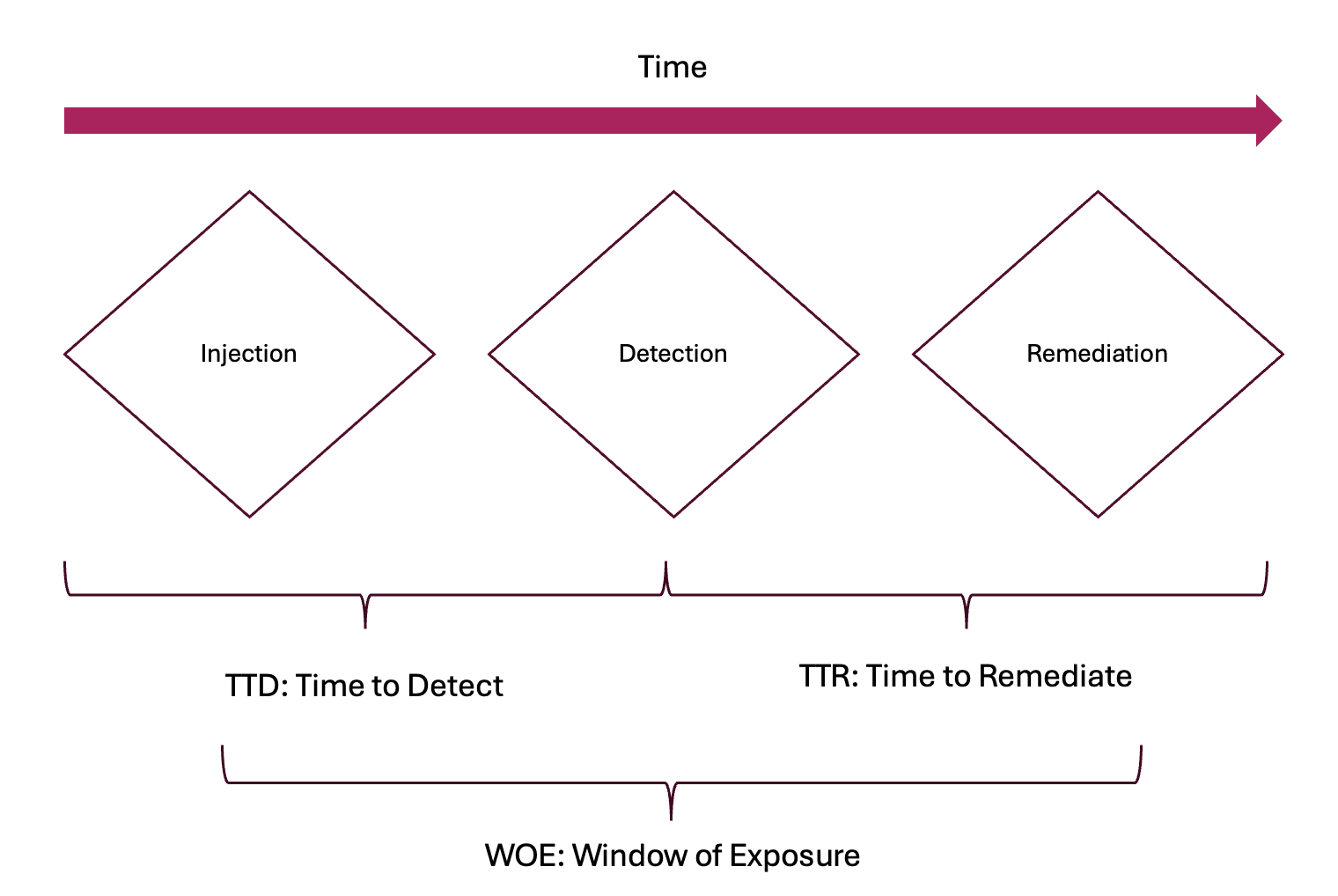
What influenced the duration it took to detect the vulnerability?
Fluid Attacks' solution is designed to test in parallel with the development process, but certain situations may impact the detection time, such as the following:
- Lack of a Health Check in applications with prior development
- Testing in the wrong branch or environment, resulting in accumulated changes and delayed commits to Fluid Attacks
- Missing key resources, such as credentials or permissions, delaying test execution
- Vulnerabilities are zero days in third-party software only just disclosed (continuous testing of applications is crucial to identify these threats as soon as they emerge)
- Sometimes human error can cause delays (Fluid Attacks mitigates this using an AI tool that helps its experts prioritize high-risk files, rotating pentester teams for varied reviews, and having dedicated teams to discard potential false positives and search deeper to reduce false negatives)
How to evaluate the suitability of a security provider?
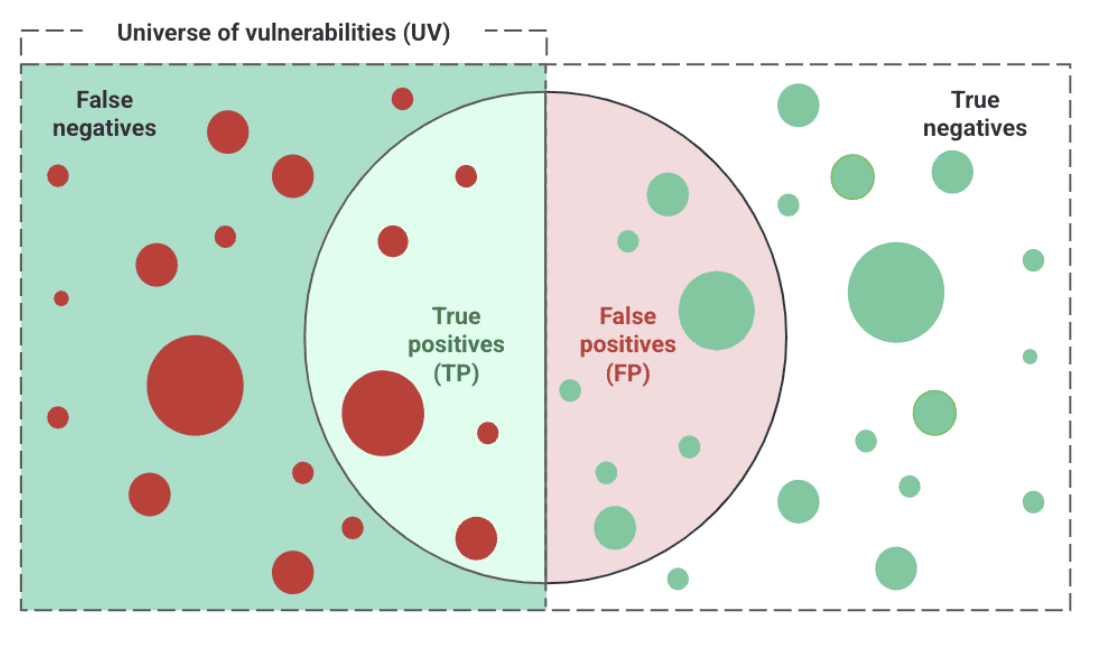
Security provider performance should instead be measured using F-Scores. This allows taking into account legitimate findings (TP), rework for engineering teams (FP), and overlooked risk (FN). The following illustration helps understand the definition of these metrics.
Now take the image below as an example to compare the results of three providers. Basing comparison on TP alone, while it might be accurate to say A has a better performance than B, an error can be made if C is said to be better than A. That is because even though C reports twice the number of TP as A, it also reports two times more FP.
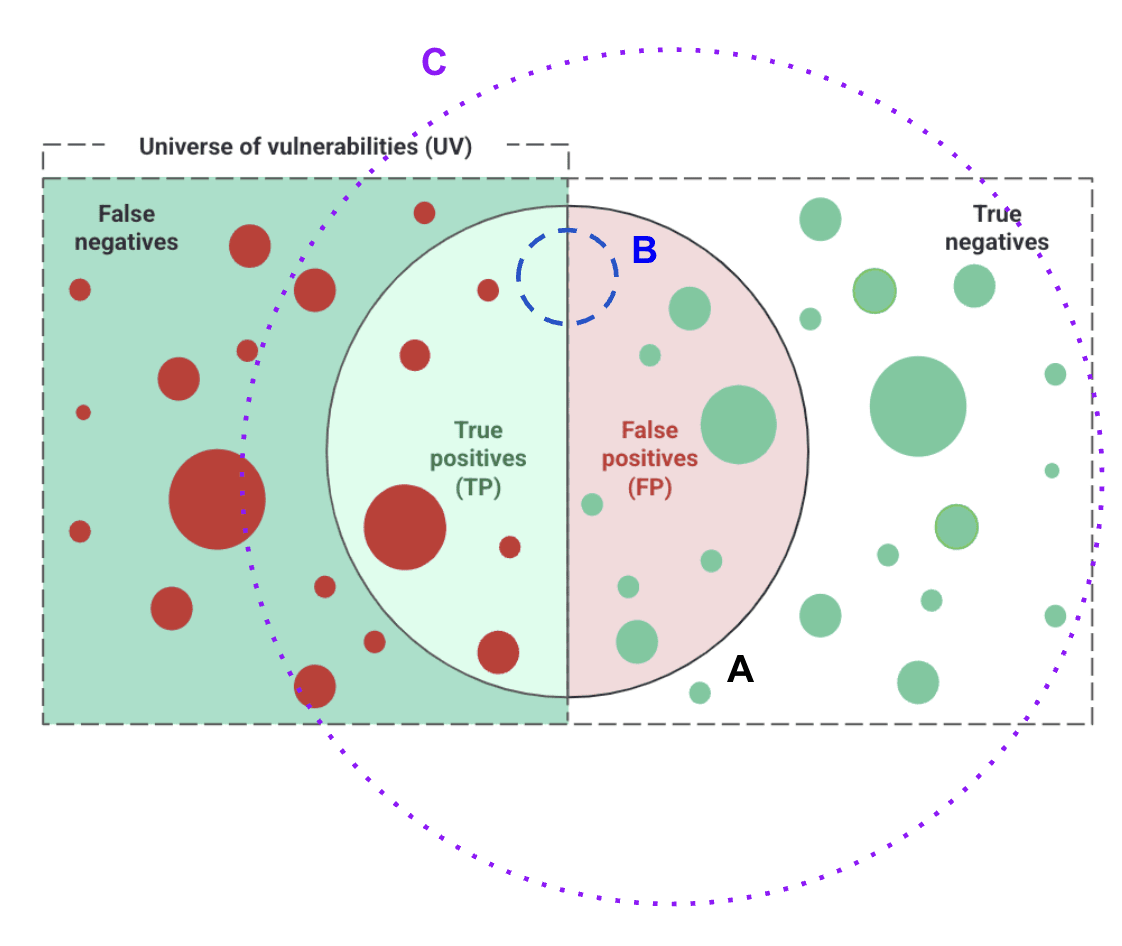
The F-Score model accurately measures the performance of tools or providers. The F2 Score alone (see formula in the note below) equals an accuracy percentage (based on vulnerability quantity) of 36% for tool A and 34% for tool C, proving that basing performance in FP quantity is misleading and could mean much more (unfruitful) rework. Fluid Attacks' Advanced plan offers a 90% accuracy SLA, measured in both F2 score and F0.5 score (which focuses on risk more than quantity).
F2 Score = 1.25 * {[Precision * Recall] / [(0.25 * Precision) + Recall]},
where
- Precision = TP / (TP + FP)
- Recall = TP / (TP + FN)
Fluid Attacks only tests applications for which you provide source code. If you upload an environment without its corresponding code, or this environment belongs to a third-party app, it will not be tested.
Does Fluid Attacks explain how to remediate a vulnerability?
For vulnerability remediation details, Fluid Attacks has a feature in its IDE extension and in its platform that allows generative artificial intelligence to create remediation guides that show developers the steps for remediation alternatives. These guides are not guaranteed to be precise and require validation by a developer having the system's context in mind. Considering these guides is, however, an excellent starting point to start remediating issues. No one at Fluid Attacks is authorized to give remediation recommendations. Advanced plan users do have an exclusive help option whereby they can talk to one of Fluid Attacks' pentesters about the detected vulnerabilities.
Can I have detailed conversations with someone at Fluid Attacks about the detected vulnerabilities?
Yes, but only with the Advanced plan. Any user from the client's side, including vendors, can request a vulnerability clarification meeting through the Talk to a Pentester feature. The individuals from Fluid Attacks' team assigned to these meetings are fully capable of effectively communicating the risks associated with a vulnerability, helping your organization to proceed with remediation. Depending on the complexity of the vulnerability, the Talk to a Pentester representative may invite the original security analysts who discovered it for further clarification. However, the Talk to a Pentester expert remains the most suitable person to facilitate these discussions.
How is it ensured that a vulnerability detected in version X is checked again in later versions Y?
Successive versions of an application share most of their functionality. Accordingly, when a new version is released, a previously reported vulnerability remains open in the platform by default. Its status changes only after verification, which follows one of two paths depending on how the vulnerability was reported.
- Deterministic automated tools (SAST, DAST, SCA, SS, CSPM, MAST, CS). Each time these scanners run, they verify whether previously reported vulnerabilities still exist. If a developer has edited part of the file and the originally reported line has moved, the scanner accounts for that change so the vulnerability is not incorrectly closed and then reopened.
- AI-based automated tools and manual reports (AI SAST, SCR, PTaaS, RE). For these sources, a user on the client side requests a re-attack from the platform, which triggers the internal review. For AI SAST, the verification is performed by the scanner; for manual testing, by a pentester.
What evidence or metrics demonstrate that the security testing process keeps pace with releases without affecting coverage or quality?
Our accuracy SLA is included in Fluid Attacks' contracts and visible to you in the platform's organization-level view at any time, without requesting a report.
We do not use coverage, because a method can test every file and still miss a critical vulnerability — coverage shows what was tested; it does not demonstrate test quality. The accuracy SLA measures what we missed instead: false negatives across your systems and versions, weighted by severity and balanced against false positives.
The primary result metric is a severity-weighted F2 score, which privileges the impact of false negatives across multiple systems and versions by giving more weight to the severity of each missed vulnerability.
Research shows that statistical prioritization of the attack surface is more effective for finding critical vulnerabilities. These models identify the highest-risk areas and direct intensive testing efforts to them. Security test quality can be measured only after the test. This measurement requires historical results from multiple systems and versions. A false negative (FN) occurs when an in-scope vulnerability was present during a previous test, but the test did not detect it.
A process that tries to reduce FNs can produce more false positives (FPs). An F-score measures the balance between these results. Fluid Attacks uses the F2 score because it gives more weight to recall and FN reduction. The calculation also considers the severity of each FN, not only the total number of FNs.
A severity-weighted F2 SLA is the main measure of security testing maturity. Meeting this SLA across successive releases shows that the testing process keeps pace without reducing quality. Other metrics measure only specific process activities and do not measure the final result.
Security testing
How does Fluid Attacks approach security test coverage?
Our solution carries a commitment to a result, not a coverage commitment.
We combine deterministic automated testing, AI-driven detection and pentesting teams, and we commit to what that combination produces: a 90% accuracy SLA on the systems under evaluation (Advanced plan). That commitment is only possible because of how the process is designed — three independent sources of vulnerability detection, directed by the algorithms that decide where our manual teams test next.
Fluid Attacks uses different approaches for automated and manual techniques. When the required CLI integrations are active, automated techniques scan 100% of the applicable files written in supported languages. Manual techniques and AI-SAST use statistical risk prioritization instead of file coverage as their operating objective. Coverage describes the tested scope; it does not measure detection effectiveness.
Automated tests can run at several points in the software development life cycle (SDLC):
- Developer environment: Developers can install the Fluid Attacks CLIs for SAST, SCA, SS, MAST, DAST, CS and CSPM on their workstations.
- CI/CD pipeline: The same CLIs can run before a change is merged into a long-lived branch and before a build is promoted to production.
- Pull request: The PR Assistant runs SAST, SCA, and SS on the code changed by each pull request.
- Platform: When changes are merged into the registered repository's branch.
The CI/CD integrations provide centralized security controls. They do not depend on each developer to start the tests, and they keep a record of the findings in the CI/CD pipeline. When configured to fail the build, they can block a change before it reaches a protected branch or production.
Together, these controls apply automated testing at multiple SDLC stages. They scan all applicable code and help detect and stop vulnerable changes before production.
Manual techniques and AI-SAST run on the platform in parallel with your development and against the latest version, never acting as a stopper. They use a risk-based approach. Statistical models identify the systems and components that require the most attention. The AI-SAST prioritization model uses the probability of a snippet containing a certain vulnerability. While the manual prioritization models use factors such as:
- The number of changes in the system
- The size of each change
- The time when each change was made
- The files with the most changes
- The number of recent authors
- The system's vulnerability history compared with other systems
- The historical ratio of critical to non-critical vulnerabilities
- Other relevant risk indicators
The models continuously select the systems and areas that independent attack teams must test. These manual teams include Systems, Criticals, Escapers, Deterministic, and Reattack. Based on the assigned risk priority, one or more teams can test the same system at the same time to find new vulnerabilities.
How does security testing align with frequent system releases?
Fluid Attacks monitors the latest commit on the branch provided by the customer. When the latest commit changes, Fluid Attacks rescans the complete repository. Build, packaging, versioning, tagging, and deployment occur later in the customer's Continuous Deployment process. A CI Gate can apply the platform's policies to control which tested commits move to production.
The customer selects the branches included in the testing scope. Fluid Attacks monitors these branches for changes. When it detects a change, it clones the repository and triggers the testing.
After testing, the customer decides whether to:
- Compile the tested code
- Package the build
- Store the artifact in a binary repository
- Assign a version number
- Promote the artifact to production
These activities occur after the security tests and remain the customer's responsibility.
Fluid Attacks recommends installing the CI Gate at the release stage of the CI/CD pipeline. The gate checks the remediation policies defined in the ASPM. If the release does not meet these policies, the gate blocks its promotion to production.
The customer is also responsible for release versioning and tagging. Fluid Attacks recommends using standard versioning practices and creating a Git tag for the exact commit promoted to production.
In the recommended process, a production release is built from a tested and tagged commit and is evaluated by the CI Gate. The in-scope branch and tagged commit serve as the source of truth. Each binary artifact has an exact link to that source.
What traceability mechanisms make it possible to identify which versions were evaluated and which ones presented vulnerabilities during the development cycle?
Fluid Attacks tests the latest version of every component you supply. We do not produce a version-by-version assessment. For source code, that means the latest commit on the branch you provide. For web and API environments, the deployed version. For mobile, the binary you upload. For cloud, the live state of your infrastructure through the API.
What evidence you get. Every vulnerability is anchored to the artifact where it was found, according to asset type:
- Source code repositories — anchored to the specific commit.
- Mobile applications — anchored to the binary version uploaded.
- Cloud environments, web and APIs — anchored to the evaluated target environment and the timestamp of the review.
Regardless of asset type, every vulnerability logged in the platform carries its location within the target environment or root directory, its report date, its current status (open or closed), and the full history of requested and verified re-attacks, including those rejected. This gives your team what it needs to identify where and when a vulnerability was detected and to drive it to closure. What it is not, and is not intended to be, is an audit trail of evaluated versions with a rating attached to each one.
Evidence
How many pieces of evidence (images and videos) do I have access to?
There is a limit of six files (images or videos). However, these are constantly updated according to the reattacks or new vulnerabilities that may be reported.
Scope
What is a nickname?
A nickname is a term a team gives to a repository or set of credentials to make it easier to find or identify.
Where can I find my repository's nickname?
You can find it in the Git Repositories table in the Scope section.
What is included in the scope of solution, and what is not?
What is included in the scope of Fluid Attacks follows these two conditions:
- Fluid Attacks has access to the repository and branch where the vulnerability is present before the corresponding vulnerable code was written.
- Fluid Attacks has access to the repository and branch where the vulnerability is present after the corresponding vulnerable code was written, and solution is requested.
Any other scenario is outside the scope. Some examples, not necessarily exhaustive, include:
- An environment is registered, but its source code is not.
- An environment is registered, but it does not correspond to the registered source code.
- A vulnerable service is consumed insecurely, and the service is not registered with its source code, but the consumer is.
How many branches does Fluid Attacks test?
When using the CLI
and the platform, you can test an unlimited number of branches per
repository. However, some platform repository registration rules
apply:
Repository registration rules
The following rules apply to active repositories within an
organization. Inactive repositories do not count toward these rules.
- A
repositorycannot appear more than once in the samegroup. - A
repositorycan appear in multiplegroups, as long as each registration uses a differentbranch. - A
repository + branchcombination cannot appear more than once in theorganization. - A
repositorycan have at most oneAdvanced planregistration in theorganization. There is no such limit forEssential plangroups.
Note: an inactive registration in the same group with the same
repository + branch is the one case where an inactive repository
still blocks a new registration. This is intentional: the way to resume
testing that combination is to reactivate the existing registration,
not to create a duplicate.
These rules are validated whenever you register a repository,
move roots, activate an inactive one, or change a group's plan.
If an action would break a rule, the platform blocks it and shows an
error describing the conflict. The name of the conflicting group is
only included when it is a group you belong to.
Read more on this in Branch testing coverage.
How many environments does Fluid Attacks test?
Fluid Attacks tests two environments per repository, provided one of them is the production environment. Bear in mind that Fluid Attacks needs the credentials for both environments.
What are the risks of testing production environments, and how does Fluid Attacks manage them?
Production tests carry some risk. Fluid Attacks manages each of these risks with specific controls:
- Service interruption: Fluid Attacks controls the intensity and pace of every test and does not use unauthorized brute-force or high-load techniques. The risk to your application's availability is minimal. If a test could affect availability, Fluid Attacks first runs it in a non-production environment. Fluid Attacks also notifies you through an event and asks for a suitable time slot before any test that could affect availability. If a test needs evidence from the production environment, Fluid Attacks requests your authorization first.
- Data loss or corruption: Fluid Attacks' methodology favors non-destructive techniques and runs these tests in pre-production environments first. Fluid Attacks agrees with you in advance on any test that could alter important production data and that needs evidence.
- Exposure of confidential information: Fluid Attacks handles credentials, production test data, and findings under strict confidentiality controls. These controls include encryption and access limited to the assigned team. Fluid Attacks shares all information through the platform, under the confidentiality agreement already in place between the parties.
- Performance degradation: Fluid Attacks monitors your system's behavior during the entire test and adjusts or pauses the test immediately if it observes any impact.
- False security alerts: Fluid Attacks always tests from its own IP addresses. If a test generates a false alert on your WAF or SOC, Fluid Attacks is available to help you resolve it.
- Damage to code or configurations: Fluid Attacks does not change your production configurations. Fluid Attacks excludes any action that could have that effect from the test scope, unless you and Fluid Attacks agree on it in advance. If a pentester has any doubt during a test, the pentester stops the test.
Are production environments only tested to verify vulnerabilities in pre-production ones?
No. Fluid Attacks tests production environments completely.
Why test production environments if QA can be tested instead?
It is very likely that QA cannot reproduce the production environment exactly. Being unable to analyze the latter might be an obstacle, partly because if a vulnerability is missed, the question arises whether the tests were faulty or the analyzed environment did not reproduce the functionalities as they appear in production. Most importantly, testing software in production means securing its functionalities in the state that malicious attackers are very likely targeting. Bear in mind, Fluid Attacks tests this environment at no additional cost.
Can I remove a repository from the platform?
Yes, by using the deactivation option in the Scope section. Bear in mind that, although Fluid Attacks would no longer be in possession of the repository clone, for security and compliance reasons, the platform would keep a comprehensive audit trail, which serves as a critical record of all activities, including scan results and detected vulnerabilities. History that the repository was added and tested, as well as that vulnerabilities were found, cannot be removed, as this would be the same as erasing an event from an official log, which goes against standards and best practices.
The deactivation functionality allows you to effectively remove the repository clone, stop testing by Fluid Attacks in that repository, and mark its 'Open' vulnerabilities as 'Closed'. This approach satisfies both your need to manage vulnerabilities with Fluid Attacks in selected repositories and the platform's requirement to maintain a complete and secure history.
Does Fluid Attacks test the security of email servers?
Not currently. However, Fluid Attacks has plans to implement comprehensive email server vulnerability analysis using a multilayered approach, as described in the corresponding GitLab issue.
Does Fluid Attacks test low-code applications?
No. The methodology requires having source code stored in a Git version control system, which is a capability low-code platforms do not provide.
Reattacks
How many hours do I have to wait for a response to a reattack request?
According to our service-level agreement, at least 90% of reattack requests receive a first response within a median time of less than 8 office hours.
How do I request a reattack?
You can request a reattack from the Vulnerabilities and To-do sections. Select the vulnerability to be reevaluated and click the Reattack button. Then, the chosen vulnerability will show the "Requested" status in the Reattack column for up to 8 office hours. Remember to check the Comments section for any new comments on the reattack.
How do I know that a requested reattack is in progress?
You must verify that the Reattack column in the Vulnerabilities section shows the "Requested" status for the vulnerability you wish to be reevaluated. You can also check in the Comments section whether there are comments on the request.
I am unable to request a reattack; why?
The platform blocks a reattack only when both of these are true:
- The registered branch's current commit matches the commit the platform tracks for that vulnerability.
- That commit is 1 day old or more.
The platform never blocks a new commit on the registered branch, however recent it is.
Check these reasons, in order:
- Wrong branch. Compare the branch where you pushed your fix with the branch registered for that repository in the Scope section. If they differ, the platform cannot see your fix yet.
- Repository not synchronized. Check the Scope section for errors the last time the platform cloned the repository.
- No new changes. Confirm the repository's current commit is different from the last commit the platform analyzed. If it is the same commit and less than 1 day old, wait until it reaches 1 day. Or push a new change to that branch.
If you continue having problems with the reattack request after checking these reasons, contact us at [email protected].
Security testing certificates
How do I generate a service certificate?
In the Vulnerabilities section, click the Generate report button and select the Certificate option. However, this option will not be available if you have not filled out the Business Registration Number and Business Name fields in the Information section. Remember that the roles that can download certifications are Group Manager and Vulnerability Manager.
Reports
How do I generate the vulnerability report?
In the Vulnerability section, click the Generate report button and select which type of report you want to download, either technical or executive. The roles that can download reports are Group Manager and Vulnerability Manager.
What is the difference between executive and technical reports?
The executive report is a summary report in PDF format generally intended for personnel in management roles. This report contains concise and clear information on the vulnerabilities reported in the group. On the other hand, the technical report is an XLSX file where you have all the vulnerabilities reported in the group with their technical details.
What security requirements does Fluid Attacks verify?
Fluid Attacks verifies compliance with a vast amount of security requirements, which it has classified into the following categories: Architecture, authentication, authorization, certificates, credentials, cryptography, data, devices, emails, files, legal, logs, networks, privacy, services, session, social, source, system, and virtualization.
Members
What is the difference between members and authors?
Members refer to all users who can access your group to visualize information or manage vulnerabilities, scope and tags, among other things. Authors are all the developers, professionals, or bots who contribute to the repositories under evaluation.
Comments
What is the difference between the two comment alternatives?
Comments is one of Fluid Attacks' communication channels with users. You can find it in the Vulnerabilities and Events sections. Use the Vulnerabilities one when you have questions regarding a specific vulnerability. And use the Events one to ask about the status or details of situations that prevent security testing from resuming.
Treatments
Why does a vulnerability status still appear as "Vulnerable" when I have permanently accepted it?
When you permanently accept a vulnerability, your organization assumes the risk of not remediating it, but this does not mean the vulnerability no longer exists or that your software is now free of it.
What happens when a temporary acceptance treatment expires?
In such a case, the treatment for the security issue in question is again shown as "Untreated" and the remediation is assigned to the user who requested the temporary acceptance.
Policies
If I apply policies to a group, will these apply to all its repos?
Yes, group policies will apply to all repositories added to that group.
What is the difference between policy at the organization level and the group level?
Organization policies are those that you establish globally and are inherited by all groups belonging to an organization. Group-level policies, on the other hand, allow you to set variations on the above policies for specific groups.
CI Gate
Must I only install Docker to run the CI Gate from my local machine?
Yes. For more information, please read Install CI Gate to break the build.
Does Fluid Attacks' CI Gate run locally or on the development infrastructure?
You can run it both ways.
Is Internet connection required for using the CI Gate?
Yes. CI Gate requires access to the Internet to connect with the Fluid Attacks API.
How many arguments can I pass to run Fluid Attacks' CI Gate?
You can pass multiple arguments.
How often is it advisable to do "docker pull" to update the image?
It is up to you to do it weekly or monthly.
In what mode can Fluid Attacks' agent be run so it doesn't break the build?
In "lax mode," opposite to "strict mode."
Must all team members use the same token to run the CI Gate in a group?
Yes. To acquire the token, go to the DevSecOps section in Scope.
Do CI Gate executions fail in the case of service unavailability?
CI Gate executions fail only in the case of total service unavailability. Meaning that CI Gate can operate even if API availability is intermittent, as it is programmed to retry executions. Service availability is guaranteed by Fluid Attacks' 99.95% availability SLA.
Platform problems
What can I do if I do not see information when I enter the groups?
Please log out of the platform, delete your browser's cache and cookies, log back in, and enter the groups with the inconvenience.
What can I do if I cannot access the platform?
Try to access the platform from incognito mode or another browser and check if the problem persists. Make sure to visit the status page to check if there is a known outage affecting other users. If it seems to be just you, please email us at [email protected].
Want to dive deep into the platform? Watch tutorial videos and get a certification for free.