0 filters active
Skip to Content
logo
  • Home
  • Quick start
      • Billing
      • Integrations
      • Platform
      • Scanner
      • Ask our pentesters to explain a vulnerability
      • Fix code with gen AI from the IDE
      • See safe dependency versions
      • Import repositories to test
      • Invite team members to sign up
      • Billing for the Advanced plan
      • Continuous Hacking free trial, plans and pricing
      • Continuous Hacking methodology
      • Continuous Hacking PoV
      • CVSSF metric
      • Glossary
      • Main website
      • Platform demo
      • Tutorial videos
      • What is DAST?
      • What is SAST?
      • Assign vulnerability remediation to a team member
      • See details of the reported security vulnerabilities
    • Sign up to Fluid Attacks
      • Break the build
      • Install CI Gate to break the build
      • Verify whether a fix was successful
  • Find and fix
    • Access to your assets
      • Cloud
      • Connector
      • Egress
      • Set up an AWS IAM role
      • Summary of mechanisms used to access assets
      • Types of authentication used
      • Fix code automatically with gen AI
      • Get AI-generated guides for remediation
      • Contribute to enhancing the scanners
      • Fluid Attacks' scanners
      • Know and reproduce the scanner’s OWASP Benchmark results
      • Pentesters' tools
    • Machine
      • Configure and use Sorts on your own
      • Introduction to Fluid Attacks' AI tool
      • Accuracy SLA
      • Availability SLA
      • False negatives
      • False positives
      • Response SLA
      • Scope
      • Service-level agreement summary
        • 2023
        • 2024
        • 2025
        • 2026
      • Documentation sections
      • Roadmap
      • Supported AI functions
      • Supported attack surfaces
      • Supported binaries
      • Supported browsers
      • Supported CI/CD
      • Supported clouds
      • Supported CVEs for reachability analysis
      • Supported evidence formats
      • Supported frameworks
      • Supported IDE functionalities
      • Supported languages
      • Supported languages for vulnerability fixes
      • Supported package managers
      • Supported remediation
      • Supported SCM systems
      • Supported secrets
      • Supported standards
      • Supported ticketing systems
      • CVSS score adjustment
      • Find reachable dependency vulnerabilities
      • Vulnerability signature update
      • What is SCA?
      • APK scanner configuration file
      • DAST scanner configuration file
      • SAST scanner configuration file
      • SCA scanner configuration file
      • Scan with a configuration file
    • Use the Platform
        • Platform sections and header items
        • Sign-up and login authentication
        • Create and delete groups
        • Create another organization
        • Know your Groups section
        • Manage a group's configuration
        • Register payment information
        • See the target of evaluation's status and SBOM
        • Sort groups into portfolios
        • Invite contributing developers
        • Manage members
        • Manage your organization's authors
        • Understand roles
        • Import repositories fast and safely with OAuth
        • Manage environments
        • Manage repositories
        • Manage your credentials
        • Resolve events impeding tests
        • See retrieved repositories not yet added to any group
        • Analyze your supply chain security
        • Assign treatments
        • Correlate your threat model to vulnerabilities
        • Examine the evidence of exploitability
        • Request a vulnerability be dismissed as Zero Risk
        • See vulnerabilities assigned to you
        • See where vulnerabilities are and more details
        • Verify fixes with reattacks
        • Ask the AI Agent
        • Ask via chat
        • Post comments
        • Send Fluid Attacks an email
        • Talk to a Pentester
        • Watch certifiable tutorial videos or get a demo
        • Access recent downloads
        • Check your compliance with standards
        • View analytics common to orgs, groups and portfolios
        • Download a report of detected vulnerabilities
        • View analytics for the group level only
        • View analytics for the portfolio level only
        • Use analytics charts options
        • View and download logs
        • Accept vulnerabilities
        • Manage fix prioritization policies
        • Manage security gates
        • Prevent the deployment of builds with vulnerabilities
        • View details of the security of your builds
        • Enable and disable notifications
        • Explore the user menu
        • Leave group
        • Subscribe to news
      • Manage repositories
      • See vulnerabilities
      • Exclude findings from scan reports
      • Run scans locally
      • Understand the scanner output
      • Use standalone scanners
      • Use the scanners in CI/CD
  • Integrations
      • Local tools
      • Access Talk to a Pentester and help from Jira issues
      • Automate Jira issue creation
      • Create Jira issues for vulnerabilities
      • Go to vulnerability evidence and more from Jira issues
      • Install the Fluid Attacks app for Jira Cloud
      • Link vulnerabilities to Jira issues or unlink them
      • Request reattacks from Jira issues
      • Set up the Jira integration
      • Set up the Azure DevOps integration
      • Set up the GitLab integration
      • Install the VS Code extension
      • View vulnerable lines, use fix options and more
      • VS Code extension error and solution catalog
      • Identify and address vulnerabilities from IntelliJ
      • Install the IntelliJ plugin
      • Identify and address vulnerabilities from Cursor
      • Install the Cursor extension
      • AWS Marketplace integration
    • MCP server
      • Installation
      • Capabilities and use cases
      • Docker installation
      • Excluding files from analysis
      • Integrate with Azure DevOps Peer Reviewer Assistant
      • Integrate with GitLab Peer Reviewer Assistant
      • Troubleshooting
      • Introduction
      • Use the API
      • Learn the basics of the Fluid Attacks API
      • Things to know before using the API
  • Stack
      • Bash
      • Python
      • Terraform
      • TypeScript
      • Ariadne
      • Commitlint
      • D3
      • Docker
      • ESLint
      • GraphQL
      • Hypercorn
      • Kubernetes
      • Labels
      • Mypy
      • Nix Flakes
      • Platform audit logs
      • Platform authentication
      • Platform authorization
      • Pydantic AI
      • React
      • Ruff
      • Sops
      • Starlette
      • Tree-sitter
      • Visual Studio Code
      • AWS
      • Batch
      • Bedrock
      • BigCodeBench
      • BugSnag
      • Checkly
      • Claude 3.5 Sonnet
      • Cloudflare
      • CloudWatch
      • Cost Management
      • Datadog
      • dbt
      • DynamoDB
      • EBS
      • EC2
      • EKS
      • ELB
      • Engineering metrics
      • ePayco
      • EventBridge
      • GitLab
      • GitLab CI
      • Google Workspace
      • IAM
      • Jamf
      • KMS
      • Lambda
      • LogRocket
      • Okta
      • OpenAI
      • OpenSearch
      • Organizations
      • QuickSight
      • S3
      • SageMaker
      • Snowflake
      • Statuspage
      • Step Functions
      • Stripe
      • Treli
      • Ubiquiti
      • Vanta
      • Voyage AI
      • VPC
      • VPN
      • Zoho One
      • Zoho Sign
  • Compliance
      • Clients
      • Password policies
      • Staff
      • Access revocation
      • Clients
      • Employee termination
      • Endpoints
      • Secret rotation
      • Sessions
      • Staff
      • Distributed apps
      • Distributed firewall
      • Everything backed up
      • Multiple zones
      • Recovery objective
      • Device (re)enrolling
      • Direct hiring
      • Encryption at rest
      • Encryption in transit
      • No personal gain
      • Personnel NDA
      • Secure deletion
      • Awareness
      • Certification Hub
      • Certified cloud provider
      • Certified security analysts
      • Comprehensive reporting
      • Developing for integrity
      • Extensive hiring process
      • Monitoring
      • Production data not used for dev or test
      • Secure emails
      • Software Artifacts SLSA levels
      • Static website
      • Training plan
      • Everything as code
      • Extensive logs
      • Data privacy policy
      • Data policies
      • Email obfuscation
      • Employee time tracking software
      • Manual for the National Database Registry (NDR)
      • OTR messaging
      • Polygraph tests
      • Project pseudonymization
      • Retention
      • Secure delivery of sensitive data
      • Transparent use of cookies
      • Unsubscribe email
      • Continuity and recovery
      • Equipment and telecommuting
      • Everything is decentralized
      • Redundant roles
      • Complaint management
      • Data leakage policy
      • Ethics hotline
      • Help channel
      • Incident management
      • Information security responsibility
      • Open source
      • Quality policy
      • Status page
      • Testing our technology
      • Vulnerability releasing
  • Compare
    • 42Crunch
    • 7 Way Security
    • Aikido
    • Anvil Secure
    • Apiiro
    • AppCheck
    • Appdome
    • Appknox
    • Aqua
    • ArmorCode
    • Arnica
    • Astra
    • Base4
    • Bishop Fox
    • Black Duck
    • Black Hills
    • Breachlock
    • Bright Security
    • Burp Suite
    • Checkmarx
    • CloudGuard
    • Cobalt
    • Codacy
    • Conviso
    • Cure53
    • Cycode
    • Cyver
    • Data Theorem
    • DataDog
    • DeepSource
    • DefectDojo
    • Detectify
    • Devel
    • Dryrun Security
    • Dynatrace
    • Edgescan
    • Endor Labs
    • Escape
    • Evolve Security
    • Faraday Security
    • FortiDevSec
    • Fortify
    • GitHub Advanced Security
    • GitLab Ultimate
    • GuardRails
    • HackerOne
    • Hackmetrix
    • Hadrian
    • HCL AppScan
    • Heeler
    • Hopper Security
    • ImmuniWeb
    • Inspectiv
    • Intigriti
    • Intruder
    • Invicti
    • JFrog
    • Jit
    • Kiuwan
    • Legit Security
    • Mandiant
    • Mend
    • Mindgard
    • Moderne
    • NetSPI
    • NowSecure
    • Nucleus Security
    • Oligo Security
    • Orca Security
    • Oversecured
    • OX Security
    • Phoenix Security
    • PlexTrac
    • Praetorian
    • Prancer
    • Prisma Cloud
    • Probely
    • Prowler
    • ReversingLabs
    • RunSybil
    • Safety
    • Securitum
    • Seemplicity
    • Semgrep
    • Snyk
    • Socket
    • SonarQube
    • Sonatype
    • SOOS
    • StackHawk
    • Strike
    • Synacktiv
    • Tenable Nessus
    • ThreatModeler
    • Veracode
    • White Jaguars
    • Wiz
    • Xygeni
    • ZAP
    • ZeroPath

  • Log in to the platform 
  • Home
  • Quick start
      • Billing
      • Integrations
      • Platform
      • Scanner
      • Ask our pentesters to explain a vulnerability
      • Fix code with gen AI from the IDE
      • See safe dependency versions
      • Import repositories to test
      • Invite team members to sign up
      • Billing for the Advanced plan
      • Continuous Hacking free trial, plans and pricing
      • Continuous Hacking methodology
      • Continuous Hacking PoV
      • CVSSF metric
      • Glossary
      • Main website
      • Platform demo
      • Tutorial videos
      • What is DAST?
      • What is SAST?
      • Assign vulnerability remediation to a team member
      • See details of the reported security vulnerabilities
    • Sign up to Fluid Attacks
      • Break the build
      • Install CI Gate to break the build
      • Verify whether a fix was successful
  • Find and fix
    • Access to your assets
      • Cloud
      • Connector
      • Egress
      • Set up an AWS IAM role
      • Summary of mechanisms used to access assets
      • Types of authentication used
      • Fix code automatically with gen AI
      • Get AI-generated guides for remediation
      • Contribute to enhancing the scanners
      • Fluid Attacks' scanners
      • Know and reproduce the scanner’s OWASP Benchmark results
      • Pentesters' tools
    • Machine
      • Configure and use Sorts on your own
      • Introduction to Fluid Attacks' AI tool
      • Accuracy SLA
      • Availability SLA
      • False negatives
      • False positives
      • Response SLA
      • Scope
      • Service-level agreement summary
        • 2023
        • 2024
        • 2025
        • 2026
      • Documentation sections
      • Roadmap
      • Supported AI functions
      • Supported attack surfaces
      • Supported binaries
      • Supported browsers
      • Supported CI/CD
      • Supported clouds
      • Supported CVEs for reachability analysis
      • Supported evidence formats
      • Supported frameworks
      • Supported IDE functionalities
      • Supported languages
      • Supported languages for vulnerability fixes
      • Supported package managers
      • Supported remediation
      • Supported SCM systems
      • Supported secrets
      • Supported standards
      • Supported ticketing systems
      • CVSS score adjustment
      • Find reachable dependency vulnerabilities
      • Vulnerability signature update
      • What is SCA?
      • APK scanner configuration file
      • DAST scanner configuration file
      • SAST scanner configuration file
      • SCA scanner configuration file
      • Scan with a configuration file
    • Use the Platform
        • Platform sections and header items
        • Sign-up and login authentication
        • Create and delete groups
        • Create another organization
        • Know your Groups section
        • Manage a group's configuration
        • Register payment information
        • See the target of evaluation's status and SBOM
        • Sort groups into portfolios
        • Invite contributing developers
        • Manage members
        • Manage your organization's authors
        • Understand roles
        • Import repositories fast and safely with OAuth
        • Manage environments
        • Manage repositories
        • Manage your credentials
        • Resolve events impeding tests
        • See retrieved repositories not yet added to any group
        • Analyze your supply chain security
        • Assign treatments
        • Correlate your threat model to vulnerabilities
        • Examine the evidence of exploitability
        • Request a vulnerability be dismissed as Zero Risk
        • See vulnerabilities assigned to you
        • See where vulnerabilities are and more details
        • Verify fixes with reattacks
        • Ask the AI Agent
        • Ask via chat
        • Post comments
        • Send Fluid Attacks an email
        • Talk to a Pentester
        • Watch certifiable tutorial videos or get a demo
        • Access recent downloads
        • Check your compliance with standards
        • View analytics common to orgs, groups and portfolios
        • Download a report of detected vulnerabilities
        • View analytics for the group level only
        • View analytics for the portfolio level only
        • Use analytics charts options
        • View and download logs
        • Accept vulnerabilities
        • Manage fix prioritization policies
        • Manage security gates
        • Prevent the deployment of builds with vulnerabilities
        • View details of the security of your builds
        • Enable and disable notifications
        • Explore the user menu
        • Leave group
        • Subscribe to news
      • Manage repositories
      • See vulnerabilities
      • Exclude findings from scan reports
      • Run scans locally
      • Understand the scanner output
      • Use standalone scanners
      • Use the scanners in CI/CD
  • Integrations
      • Local tools
      • Access Talk to a Pentester and help from Jira issues
      • Automate Jira issue creation
      • Create Jira issues for vulnerabilities
      • Go to vulnerability evidence and more from Jira issues
      • Install the Fluid Attacks app for Jira Cloud
      • Link vulnerabilities to Jira issues or unlink them
      • Request reattacks from Jira issues
      • Set up the Jira integration
      • Set up the Azure DevOps integration
      • Set up the GitLab integration
      • Install the VS Code extension
      • View vulnerable lines, use fix options and more
      • VS Code extension error and solution catalog
      • Identify and address vulnerabilities from IntelliJ
      • Install the IntelliJ plugin
      • Identify and address vulnerabilities from Cursor
      • Install the Cursor extension
      • AWS Marketplace integration
    • MCP server
      • Installation
      • Capabilities and use cases
      • Docker installation
      • Excluding files from analysis
      • Integrate with Azure DevOps Peer Reviewer Assistant
      • Integrate with GitLab Peer Reviewer Assistant
      • Troubleshooting
      • Introduction
      • Use the API
      • Learn the basics of the Fluid Attacks API
      • Things to know before using the API
  • Stack
      • Bash
      • Python
      • Terraform
      • TypeScript
      • Ariadne
      • Commitlint
      • D3
      • Docker
      • ESLint
      • GraphQL
      • Hypercorn
      • Kubernetes
      • Labels
      • Mypy
      • Nix Flakes
      • Platform audit logs
      • Platform authentication
      • Platform authorization
      • Pydantic AI
      • React
      • Ruff
      • Sops
      • Starlette
      • Tree-sitter
      • Visual Studio Code
      • AWS
      • Batch
      • Bedrock
      • BigCodeBench
      • BugSnag
      • Checkly
      • Claude 3.5 Sonnet
      • Cloudflare
      • CloudWatch
      • Cost Management
      • Datadog
      • dbt
      • DynamoDB
      • EBS
      • EC2
      • EKS
      • ELB
      • Engineering metrics
      • ePayco
      • EventBridge
      • GitLab
      • GitLab CI
      • Google Workspace
      • IAM
      • Jamf
      • KMS
      • Lambda
      • LogRocket
      • Okta
      • OpenAI
      • OpenSearch
      • Organizations
      • QuickSight
      • S3
      • SageMaker
      • Snowflake
      • Statuspage
      • Step Functions
      • Stripe
      • Treli
      • Ubiquiti
      • Vanta
      • Voyage AI
      • VPC
      • VPN
      • Zoho One
      • Zoho Sign
  • Compliance
      • Clients
      • Password policies
      • Staff
      • Access revocation
      • Clients
      • Employee termination
      • Endpoints
      • Secret rotation
      • Sessions
      • Staff
      • Distributed apps
      • Distributed firewall
      • Everything backed up
      • Multiple zones
      • Recovery objective
      • Device (re)enrolling
      • Direct hiring
      • Encryption at rest
      • Encryption in transit
      • No personal gain
      • Personnel NDA
      • Secure deletion
      • Awareness
      • Certification Hub
      • Certified cloud provider
      • Certified security analysts
      • Comprehensive reporting
      • Developing for integrity
      • Extensive hiring process
      • Monitoring
      • Production data not used for dev or test
      • Secure emails
      • Software Artifacts SLSA levels
      • Static website
      • Training plan
      • Everything as code
      • Extensive logs
      • Data privacy policy
      • Data policies
      • Email obfuscation
      • Employee time tracking software
      • Manual for the National Database Registry (NDR)
      • OTR messaging
      • Polygraph tests
      • Project pseudonymization
      • Retention
      • Secure delivery of sensitive data
      • Transparent use of cookies
      • Unsubscribe email
      • Continuity and recovery
      • Equipment and telecommuting
      • Everything is decentralized
      • Redundant roles
      • Complaint management
      • Data leakage policy
      • Ethics hotline
      • Help channel
      • Incident management
      • Information security responsibility
      • Open source
      • Quality policy
      • Status page
      • Testing our technology
      • Vulnerability releasing
  • Compare
    • 42Crunch
    • 7 Way Security
    • Aikido
    • Anvil Secure
    • Apiiro
    • AppCheck
    • Appdome
    • Appknox
    • Aqua
    • ArmorCode
    • Arnica
    • Astra
    • Base4
    • Bishop Fox
    • Black Duck
    • Black Hills
    • Breachlock
    • Bright Security
    • Burp Suite
    • Checkmarx
    • CloudGuard
    • Cobalt
    • Codacy
    • Conviso
    • Cure53
    • Cycode
    • Cyver
    • Data Theorem
    • DataDog
    • DeepSource
    • DefectDojo
    • Detectify
    • Devel
    • Dryrun Security
    • Dynatrace
    • Edgescan
    • Endor Labs
    • Escape
    • Evolve Security
    • Faraday Security
    • FortiDevSec
    • Fortify
    • GitHub Advanced Security
    • GitLab Ultimate
    • GuardRails
    • HackerOne
    • Hackmetrix
    • Hadrian
    • HCL AppScan
    • Heeler
    • Hopper Security
    • ImmuniWeb
    • Inspectiv
    • Intigriti
    • Intruder
    • Invicti
    • JFrog
    • Jit
    • Kiuwan
    • Legit Security
    • Mandiant
    • Mend
    • Mindgard
    • Moderne
    • NetSPI
    • NowSecure
    • Nucleus Security
    • Oligo Security
    • Orca Security
    • Oversecured
    • OX Security
    • Phoenix Security
    • PlexTrac
    • Praetorian
    • Prancer
    • Prisma Cloud
    • Probely
    • Prowler
    • ReversingLabs
    • RunSybil
    • Safety
    • Securitum
    • Seemplicity
    • Semgrep
    • Snyk
    • Socket
    • SonarQube
    • Sonatype
    • SOOS
    • StackHawk
    • Strike
    • Synacktiv
    • Tenable Nessus
    • ThreatModeler
    • Veracode
    • White Jaguars
    • Wiz
    • Xygeni
    • ZAP
    • ZeroPath

  • Log in to the platform 

On This Page

  • Device management
  • Self-service
  • Inventory management
  • Requirements for laptops
  • Device policy
  • Authorization
  • Updates
  • Users
  • Preferences
  • Networking
  • Auditing
  • Removable devices
  • Requirements for mobile devices
  • References
  • Requirements
  • Other secure authorization measures
ComplianceAuthorizationEndpoints

Endpoint management

Device management

At Fluid Attacks, in order to protect our clients’ data, we administer our devices with a Mobile Device Management (MDM) tool.

This tool enables the following:

  • Comprehensive visibility into macOS security tools, device compliance, overall fleet risk, and unified logging
  • Applying hardening configurations by installing pre-configured security profiles
  • Blocking malware, locking down command and control traffic, restricting removable media, and filtering malicious websites and content
  • Real-time detection of phishing, malicious activity and threats through behavioral analytics and customizable threat hunting
  • Swift investigation of issues and automation of remediation workflows

Each user account is associated with a device, and access to these is also monitored and controlled (see the article about device (re)enrollment ).

The profiles are set up with different configurations following our criteria.
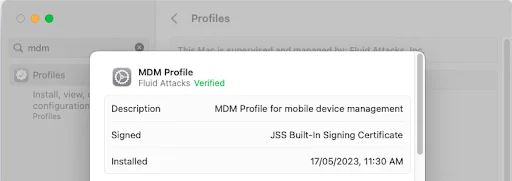
MDM Profile reference in machines used by Fluid Attacks

Self-service

The Self-Service function allows users to manage their own enterprise app store. This gives them the ability to install apps, update software and maintain their own device without a help desk ticket. All Self-Service-hosted applications are analyzed and approved/denied by our IT Manager and CTO. This applies to any additional application request.

Inventory management

The MDM tool automatically collects data from our IT assets, such as:

  • Hardware:
    • Device type/model/name
    • Serial number
    • Unique Device Identifier (UDID)
    • Battery level
  • Software:
    • OS version
    • Applications installed and versions
    • Storage capacity
  • Security:
    • Encryption status
    • System configurations
    • Software restrictions
    • Jailbreak detection
  • Management:
    • Managed status
    • Supervised status
    • IP address
    • Enrollment method

Requirements for laptops

Device policy

Since we use different configuration profiles for our laptops for users and admins, such profiles are configured with different policies:

Authorization

How the devices can be accessed only by their intended users and how permissions over said device are managed. We comply with the following criteria:

  • Laptops’ passwords and data are visible only to their users. The use of KeyChain  is mandatory for all users for security purposes; to protect passwords saved in KeyChain, it automatically locks when the computer is locked or suspended.
  • Only administrators have access to administration data. Admin users’ permissions are limited to their tasks, meaning there are no root users or root accounts enabled.
  • Automatic login is disabled to prevent data leaks; a password is required for system configuration and to access data.
  • A minimum set of requirements must be followed for passwords: a minimum set of 16 characters including at least two non alphanumeric, not to have two consecutive nor three sequential characters, at least one number and one alphabetic, not to be the same as the previous 50 passwords.
  • Passwords have an age limit established, and a history of passwords is saved for future password checking.

Requirements: 300 , 185 , 375 , 096 , 033 , 341 , 095 , 257 , 186 , 229 , 227 , 380 , 310 , 133 , 130 , 129 , 141 , and 369 .

Updates

Keep devices and apps updated with their latest and secure versions.

Users

Control how login is made on the device and local accounts are created improving the security:

  • The guest account allows users access to the system without having to create an account or password. Guest users are unable to make setting changes, cannot remotely log in to the system, and all created files, caches, and passwords are deleted upon logging out.
  • The login window prompts a user for his/her credentials, verifies their authorization level and then allows or denies the user access to the system.
  • The presence of the Guest home folder can cause automated audits to fail when looking for compliant settings within all User folders as well. Rather than ignoring the folders’ continued existence, it is best removed.

Requirements: 142 , 264 , 265 , 266 , and 319 .

Preferences

What the user can accomplish with manual configurations on the devices, restrict access to unnecessary system configurations to devices depending on their use for the different roles.

Requirements: 265 , 261 , 266 , 177 , 045 , 046 , 339 , 185 , 273 , 141 , and 173 .

Networking

How we handle insecure protocols and services, which can compromise the data stored on the devices:

HTTP Apache server and NFSD is part of the operating system and can be easily turned on to share files and provide remote connectivity to an end-user computer. Web sharing should only be done through hardened web servers and appropriate cloud services.

Requirements:: 265  and 266 .

Auditing

How we handle logs and monitor our devices for auditing purposes:

  • The audit system writes important operational and security information that can be both useful for an attacker and a place for an attacker to attempt to obfuscate unwanted changes that were recorded. As part of defense-in-depth, the /etc/security/audit_control configuration and the files in /var/audit should be owned only by root with group wheel with read-only rights and no other access allowed. ACLs should not be used for these files.
  • The socketfilter firewall is what is used when the firewall is turned on in the Security PreferencePane. In order to appropriately monitor what access is allowed and denied logging must be enabled.

Requirements: 080 , 377 , 378 , 079 , and 075 .

Removable devices

All removable devices can be limited and controlled, including external disks, disk images, DVD-RAM, USB storage devices, and removable disc media, such as CDs, CD-ROMs, DVDs and recordable discs.

The status of the control can be mountable and not mountable. Our current policy is completely restrictive, none of these devices can be mounted.

Requirements: 265 , 266 , and 273 .

Requirements for mobile devices

Our collaboration systems also provide security requirements that mobile devices must comply with before enrolling in the organization’s systems. This is especially useful as personal mobile devices are common targets for malicious hackers.

Some of the requirements are the following:

  • Having a separate work profile to isolate the information from the rest of the phone
  • Establishing a strong passphrase
  • Setting biometric authentication  in case the device supports it

Fluid Attacks staff access and agree to the Endpoint Secure Management Policy through Vanta .

References

  • SOC2®-CC6_2. Logical and physical access controls 
  • MITRE ATT&CK®-M1043. Credential access protection 
  • SANS 25-14. Improper Authentication 
  • POPIA-3A_23. Access to personal information 
  • PDPO-S1_4. Security of personal data 
  • CMMC-IA_L1-3_5_2. Authentication 
  • HITRUST CSF-10_c. Control of internal processing 
  • OWASP MASVS-V8_10. Resilience requirements - Device binding 
  • OWASP ASVS-4_3_1. Other access control considerations 

Requirements

  • 033. Restrict administrative access 
  • 045. Remove metadata when sharing files 
  • 046. Manage the integrity of critical files 
  • 075. Record exceptional events in logs 
  • 079. Record exact occurrence time of events 
  • 080. Prevent log modification 
  • 095. Define users with privilege 
  • 096. Set user’s required privileges 
  • 129. Validate previous passwords 
  • 130. Limit password lifespan 
  • 133. Password with at least 20 characters 
  • 141. Force re-authentication 
  • 142. Change system default credentials 
  • 173. Discard unsafe inputs 
  • 177. Avoid caching and temporary files 
  • 185. Encrypt sensitive information 
  • 186. Use the principle of less privilege 
  • 205. Configure PIN 
  • 213. Allow geographic location 
  • 227. Display access notification 
  • 229. Request access credentials 
  • 231. Implement a biometric verification component 
  • 257. Access based on user credentials 
  • 261. Avoid exposing sensitive information 
  • 264. Request authentication 
  • 265. Restrict access to critical processes 
  • 266. Disable insecure functionalities 
  • 273. Define a fixed security suite 
  • 300. Mask sensitive data 
  • 310. Request user consent 
  • 319. Make authentication options equally secure 
  • 326. Detect rooted devices 
  • 329. Keep client-side storage without sensitive data 
  • 339. Avoid storing sensitive files in the web root 
  • 341. Use the principle of deny by default 
  • 369. Set a maximum lifetime in sessions 
  • 373. Use certificate pinning 
  • 375. Remove sensitive data from client-side applications 
  • 377. Store logs based on valid regulation 
  • 378. Use of log management system 
  • 380. Define a password management tool 

Other secure authorization measures

  • Access revocation 
  • Authorization for clients 
  • Authorization for Fluid Attacks staff 
  • Employee termination 
  • Secret rotation 
  • Session management 
Last updated on February 16, 2026
Employee terminationSecret rotation

Fluid Attacks 2026. All rights reserved.