SLSA compliance
Last updated: Mar 2, 2026
The SLSA (Supply-chain Levels for Software Artifacts) framework helps organizations measure the level of assurance that the software artifacts they produce actually contain and use what they intended (integrity), by ensuring that the whole build and release process, and all of the involved sources and dependencies, cannot be tampered with.
In this document, we use version 0.1 of the specification .
Our current SLSA level is 2. The following is a detail of the levels achieved on each of the requirements:
| Requirement | Level |
| Source - Version controlled | 4 |
| Source - Verified history | 4 |
| Source - Retained indefinitely | 4 |
| Source - Two person reviewed | 3 |
| Build - Scripted build | 4 |
| Build - Build service | 4 |
| Build - Build as code | 4 |
| Build - Ephemeral environment | 4 |
| Build - Isolated | 2 |
| Build - Parameter-less | 4 |
| Build - Hermetic | 4 |
| Build - Reproducible | 3 |
| Provenance - Available | 4 |
| Provenance - Authenticated | 4 |
| Provenance - Service generated | 4 |
| Provenance - Non-falsifiable | 4 |
| Provenance - Dependencies complete | 4 |
| Common - Security | 4 |
| Common - Access | 3 |
| Common - Superusers | 3 |
For clarity, this is how SLSA definitions map into our infrastructure:
- Source: Git repository at fluidattacks/universe
- Platform: GitLab CI/CD and the Nix package manager
- Build service: GitLab CI/CD and related infrastructure
- Build: A Nix derivation
- Environment:
A sandbox that chroot
into an empty temporary directory,
provides private versions of
/proc,/dev,/dev/shm, and/dev/pts, and uses a private PID, mount, network, IPC, and UTS namespace to isolate itself from other processes in the system. - Steps: Instructions declared in the corresponding Makes configuration files written using the Nix programming language and shell scripting, versioned as code in the source.
Source requirements
Version controlled
Every change to the source is tracked in a version control system that meets the following requirements:
-
Change history: There exists a record of the history of changes that went into the revision. Each change contains the identities of the uploader and reviewers (if any), timestamps of the reviews (if any) and submission, the change description/justification, the content of the change, and the parent revisions. Example: MR 28742 .
-
Immutable reference: There exists a way to indefinitely reference a particular, immutable revision. Example: 1e1cb90fe224fb033b582829aad903cfef4ae9b9 .
Verified history
Every change in the revision’s history needs to pass through a merge request.
To create or approve a merge request, both the author and the reviewer need to be strongly authenticated into GitLab. The authentication process requires 2FA, and the dates of the change are recorded in the merge request.
Only users who were previously granted access by a platform Admin can create or review merge requests. Example: MR 28742 .
Retained indefinitely
The revision and its change history are preserved indefinitely and cannot be deleted or modified (not even with multi-party approval).
At the moment, no legal requirement impedes us to preserve indefinitely our change history, and no obliteration policy is in effect. In fact, our source code is Free and Open Source Software: change history .
Two person reviewed
Every change within the revision’s history must be approved by at least one trusted individual before submission. Moreover, each of these trusted individuals must authenticate into the platform using 2FA before granting approval.
Build requirements
Scripted build
All build steps were fully defined using GitLab CI/CD and Nix.
Manual commands are not necessary to invoke the build script. A new build is triggered automatically each time new changes are pushed to the repository. Examples: 1 , 2 , and 3 .
Build service
All build steps run on GitLab CI/CD.
Build as code
All build steps have been stored and versioned in the Git repository: .gitlab-ci.yml .
Ephemeral environment
Our build service runs each build step inside a container that is provisioned solely for each build and not reused from a prior build. Example: container image .
Additionally, the Nix package manager provides an ephemeral environment to each of the derivations.
Isolated
Our build service ensures that the build steps run in an isolated environment free of influence from other build instances, whether prior or concurrent, by using containerization technologies.
Builds are executed using the Nix package manager ,
which prevents builds from accessing any external environment variables,
network resources, sockets, or paths in the file system.
It provides private versions of /proc, /dev, /dev/shm, and /dev/pts,
and uses a private PID, mount, network, IPC, and UTS namespace
to isolate the build from other builds happening concurrently in the system.
Input-addressed build caches are used to speed up the pipeline.
Parameter-less
The build output cannot be affected by user parameters other than the build entry point and the top-level source location.
To modify the build output, a change to the source code must happen first.
Hermetic
Builds are executed using the Nix package manager , which prevents builds from accessing any external environment variables, network resources, sockets, or paths in the file system.
All transitive build steps, sources, and dependencies are fully declared up front with immutable references.
The Nix package manager :
- Fetches all of the declared artifacts into a trusted control plane (the /nix/store).
- Mounts into the build sandbox the specific /nix/store paths required by it.
- Allows a build to fetch artifacts over the network if and only if the expected artifact integrity is specified.
- Validates the integrity of each artifact before allowing a build to use it, and fails the build if the verification fails.
- Denies network connectivity if no expected hash is specified.
Reproducible
All of our build scripts are intended to be reproducible. The reproducibility guarantees of our build scripts are those of the Nix package manager . If a build fails to be reproducible, we do not explicitly define why.
Provenance requirements
In SLSA, “Provenance” is a piece of verifiable information about software artifacts describing where, when and how they were produced.
The purpose of this requirement is to protect consumers from using a compromised package:
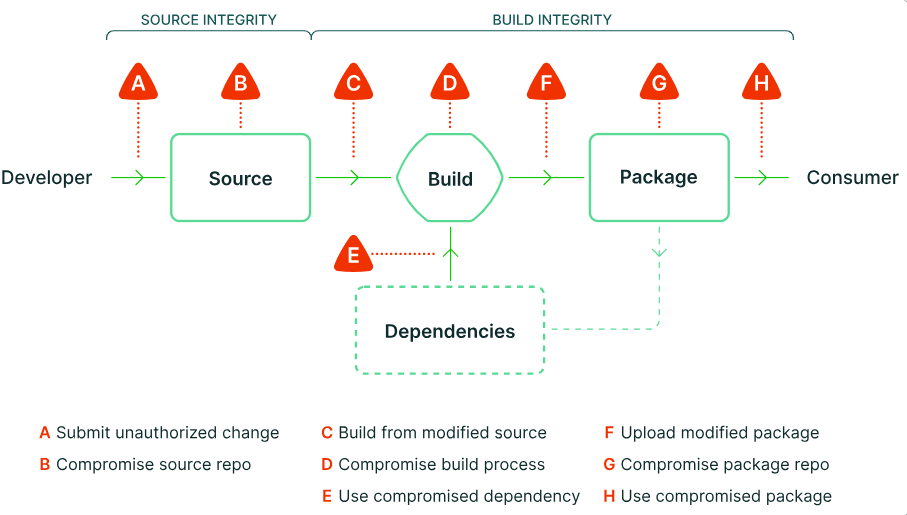
At Fluid Attacks, consumers and builders are the same entity. We don’t use artifacts or packages as a means of distribution. Instead, consumers use Makes , a source identifier, and the target artifact identifier, and then all sources, dependencies and intermediate artifacts are built locally in the consumer machine using the Nix package manager by following the steps and environment defined as-code in the source.
Available
Provenance is produced by Makes, and exposed by the build service as a JSON document together with the artifacts produced by the build.
Only builds that produce artifacts generate provenance, because if a build does not produce artifacts, then there wouldn’t be something to verify the provenance of.
Authenticated
The authenticity of the provenance comes from the fact that it can be downloaded from the build service itself, and therefore, the authenticity claim is as strong as the Build and Source Requirements are secure.
The integrity of the provenance is displayed in the logs and generated by Makes.
Service generated
The data in the provenance is exposed by the build service and is generated by Makes.
Regular users of the service are not able to inject or alter the contents because a build is fully determined and automated by its configuration, and the configuration comes directly from the source.
Non-falsifiable
The provenance cannot be falsified by the build service’s users:
- There is no secret material to demonstrate the non-falsifiable nature of the provenance.
- Even if such secret material existed, builds are run in a hermetic environment, and therefore they wouldn’t be available to the build steps.
- Every field in the provenance is generated by the build service in a trusted control plane, which is fully defined by the build configuration, which comes directly from the source, and therefore is as secure as the source is.
Dependencies complete
The provenance contains all the dependencies that were available while running the build steps. This is guaranteed by the fact that builds are hermetic. So for a build to succeed, all of its dependencies must be declared, and therefore the build tools (Makes and Nix), which fetched them at build time, have strong knowledge of their existence.
Common requirements
Security
For more information, see Fluid Attacks’ security page.
Access
Our build service is SaaS, which means physical access is not possible. Administrators can access the build machines through remote protocols without multi-party approval.
Superusers
Only a small number of platform admins may override the guarantees provided by SLSA. Doing so does not currently require the approval of a second platform admin.