Custom remediation guides
Last updated: Sep 30, 2026
AI-generated guides and automatic fixes are available only in supported languages. They apply only to vulnerabilities from static application security testing (SAST) or secure code review (SCR).
Always examine the accuracy of the remediation suggestions from the AI.
The Custom Fix feature of Fluid Attacks gives targeted guidance to fix the vulnerabilities in your code. Custom Fix uses Claude Sonnet 4, an AI model from Anthropic. It makes a detailed remediation guide for each vulnerability. The feature is at this time available in the Fluid Attacks platform, the VS Code extension, the Cursor extension, and the IntelliJ plugin.
Below is a short explanation of how Custom Fix works and how to use it.
How Custom Fix works
Custom Fix uses the code analysis and code generation capabilities of Claude Sonnet 4. It makes a step-by-step guide to remediate the security vulnerability. To do this, it sends a minimal fragment of the vulnerable code to the Claude instance on Amazon Bedrock.
Amazon Bedrock controls your data with its data use policies. Fluid Attacks does not use your code for a different purpose. It does not keep or share your code. Your intellectual property stays confidential and complete.
Notes on the generation of the guides:
- Initial generation: The first guide for a vulnerability can be slow.
- Caching for efficiency: Fluid Attacks caches each generated guide. The next requests for the same vulnerability are much faster.
- Updating guides: If the vulnerable commit changes, Custom Fix makes a new guide for the new code. It uses the code version that Fluid Attacks keeps, not your local code. If you change the code, push the changes to your repository. Then synchronize the repository with the Fluid Attacks platform.
For details on how Fluid Attacks uses Claude and protects your data, see the IDE extension FAQ.
Use Custom Fix
You can use Custom Fix from the platform or from the IDE. The feature is not available for some vulnerabilities.
To use Custom Fix on the platform, follow these steps:
-
Open the group with the vulnerability.
-
In the Vulnerabilities section of the group, click the weakness.

-
Click the vulnerability that you want to fix.

-
In the pop-up window, click the fix button (wrench icon). The remediation steps appear in the window.

-
Examine the output carefully before you fix your code.
To use Custom Fix in the IDE, install the Fluid Attacks extension first. These links give the instructions: VS Code, Cursor, and IntelliJ. Then follow these steps:
-
Click the Fluid Attacks extension in the activity bar of the IDE. Find the file with the vulnerability that you want to fix.
-
Click the Custom Fix icon next to that file. The icon is a wrench on VS Code and Cursor, and a wand on IntelliJ.
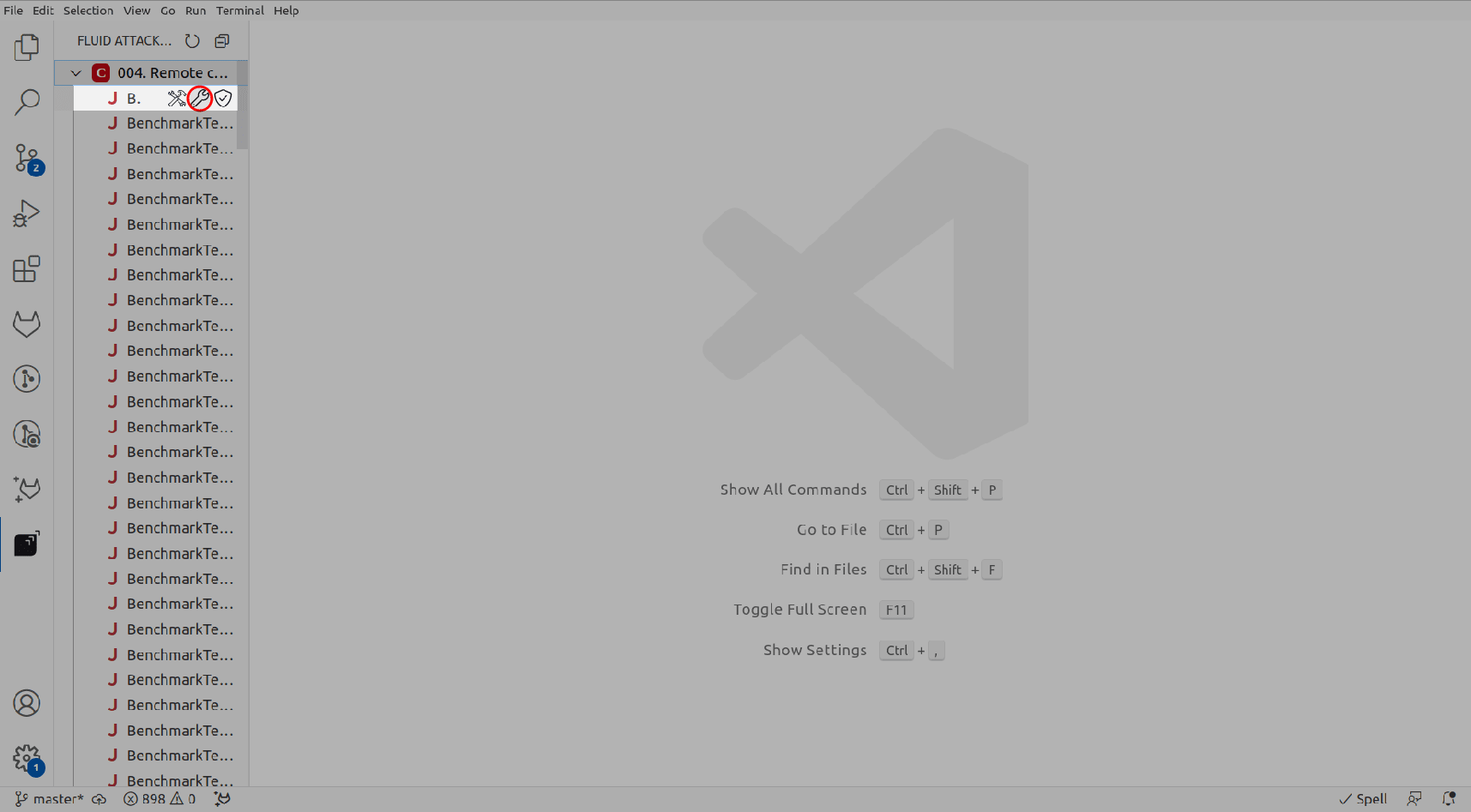
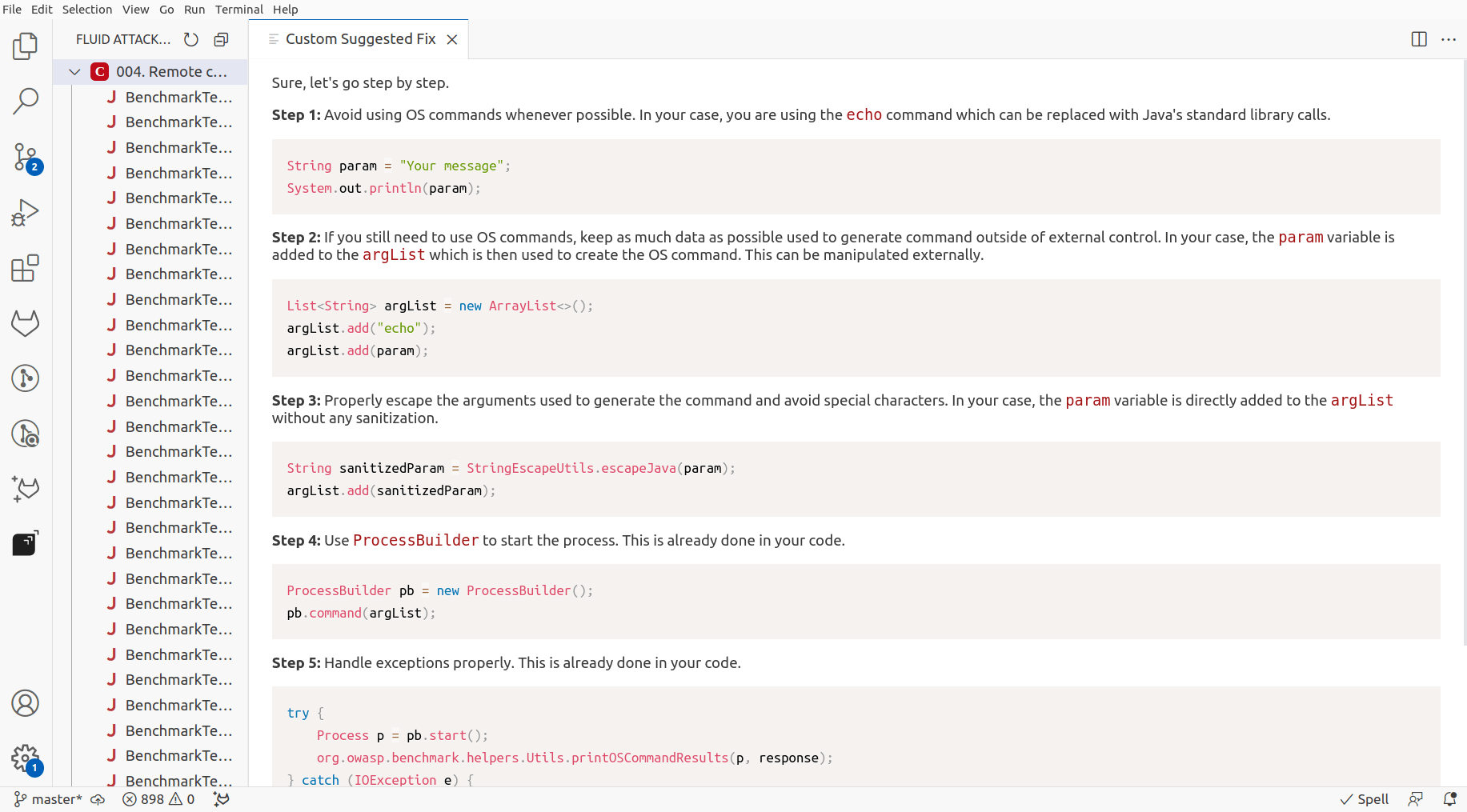
Custom Fix connects to the Claude AI model. The model analyzes the code and makes the guide. The step-by-step guide appears in the IDE in some seconds.
-
Examine the output of Custom Fix. Follow the suggestions only after you make sure that the code is secure.
The Fluid Attacks GenAI uses the Fixes documentation. It covers languages, infrastructure as code (IaC), and configuration files, such as Android, Azure, CloudFormation, Docker, Docker Compose, Helm, JavaScript, Kotlin, and Terraform.
Search for vulnerabilities in your apps for free with Fluid Attacks' automated security testing! Start your 21-day free trial and discover the benefits of the Essential plan. If you prefer the Advanced plan, which includes the expertise of Fluid Attacks' pentesting team, complete this contact form.